

Quick answer
Yes — non-technical users can do meaningful data analysis using AI-powered analytics tools with natural language querying. Business users ask questions in plain English or Hindi (e.g., "Show me top customers by revenue this quarter"), and the AI retrieves, analyses, and visualises the data instantly — without any SQL, coding, or technical training.
Yes — with the right tools, non-technical business users can do data analysis independently and effectively. The key is not eliminating data complexity; it's putting the right interface between the user and the data.
Why Non-Technical Users Could Not Do Data Analysis Before
Traditional data analysis required:
- SQL to query databases — a programming language with significant learning curve
- Python or R for statistical analysis — requires coding knowledge
- BI tool training — Power BI DAX formulas, Tableau calculated fields
- Database structure knowledge — knowing which tables hold which data
- Data analyst support — business users had to submit requests and wait
This created a fundamental dependency: every business question required a technical intermediary. The business user described what they wanted; the analyst translated it into code; the result came back hours or days later.
This bottleneck made real-time data exploration inaccessible to most of the organisation.
How Non-Technical Users Can Do Data Analysis Today
1. Natural Language Querying (NLQ)
The most powerful enabler: natural language querying allows users to ask data questions in plain English or Hindi.
Instead of writing a SQL query like:
SELECT customer_name, SUM(invoice_amount) as revenue
FROM sales_vouchers
WHERE voucher_date >= '2026-01-01'
GROUP BY customer_name
ORDER BY revenue DESC
LIMIT 10;
A non-technical user simply types: "Show me my top 10 customers by revenue this year"
The AI translates the question into the appropriate query, executes it, and presents results as a visualisation — all in seconds. That translation step is what NLQ to SQL describes in detail. See how to analyze data without SQL.
2. No-Code Dashboard Builders
Drag-and-drop dashboard interfaces allow non-technical users to:
- Select metrics from a list
- Choose chart types (bar, line, pie, gauge)
- Apply filters (date ranges, categories, specific values)
- Share dashboards without any publishing workflow
No formulas, no code, no technical setup.
3. Pre-Built Analytics Templates
Most modern BI platforms include ready-made dashboard templates for common use cases:
- Sales performance dashboard
- Financial P&L summary
- Inventory status dashboard
- Customer analytics
A non-technical user selects the template, connects their data source, and the dashboard is pre-populated with the right metrics and charts.
4. Conversational Follow-Up
Advanced AI systems support multi-step conversational analysis:
- "Show me sales last month"
- "Now break it down by product"
- "Which product had the highest growth?"
- "What drove that growth?"
Each follow-up question builds on the previous answer — the same way you'd ask a colleague, without starting over with each question.
Examples: What Non-Technical Users Can Analyse
Finance Manager (no SQL knowledge):
- "What is our gross margin by product this quarter?"
- "Show me all customers with overdue invoices over 60 days"
- "How has our expense-to-revenue ratio changed this year?"
Sales Head:
- "Which salespeople are below 70% of target this month?"
- "Show me new customers acquired in South region Q1"
- "What is the average deal size trend over the last 12 months?"
Operations Manager:
- "Which SKUs have less than 7 days of stock at current velocity?"
- "Show me delivery exceptions by route last week"
- "Compare production output this shift vs last week same shift"
Business Owner:
- "What was my net profit last month?"
- "Which product made the most money this year?"
- "Show me cash position this week vs same period last month"
What Non-Technical Users Still Need
Natural language analytics doesn't mean no preparation is required:
- Data quality: The underlying data must be accurate — garbage in, garbage out
- Defined metrics: Business terms like "revenue" and "active customer" need agreed definitions
- Connected data sources: The BI platform must be connected to the right data
These setup steps require a technical person once. After that, non-technical users operate independently. See no-code analytics for tools that minimise even this initial setup.
Ready to act on your data?
See how teams use FireAI to ask in plain language and get analytics they can trust.
Explore FireAI workflows
Go from this topic into product features and solution paths that match what you read here.
Topic hub
AI Analytics
Guides on natural language querying, AI-powered analytics, forecasting, anomaly detection, and automated insights.
Explore hubFrequently asked questions
Can a business owner analyse their own data without a data analyst?
Yes. With AI analytics tools that support natural language querying, a business owner can ask questions like "What were my top 5 products by margin last month?" in plain English or Hindi and get an instant answer — without any analyst, SQL, or technical training.
What is the easiest data analysis tool for non-technical users?
For Indian businesses, FireAI is the easiest option — it uses natural language querying in Hindi and English, connects natively to Tally, and requires no technical configuration. Zoho Analytics with Ask Zia is another accessible option. Both allow non-technical users to explore data without any SQL or coding knowledge.
Can non-technical users build dashboards without coding?
Yes. Modern BI tools offer drag-and-drop dashboard builders, pre-built templates, and AI-powered dashboard generation that require no coding. Non-technical users can build, share, and maintain dashboards independently — the technical setup is a one-time activity done by the BI platform or an initial IT configuration.
What is the difference between a non-technical analyst and a data analyst?
A data analyst has technical skills — SQL, Python, statistical methods — for complex analysis and data engineering. A non-technical business analyst (using self-service tools) handles standard queries, dashboard creation, and routine investigation. Both are valuable — AI tools expand what non-technical users can do, but don't eliminate the need for deep technical analysis.
Related in this topic
What is Self-Service BI? Benefits and Tools
Self-service BI empowers business users to analyze data independently without IT assistance. Learn how self-service BI works, which tools enable it, and how to implement it to democratize data access and accelerate decision-making.
What is No-Code Analytics? Definition, Tools, and Benefits
No-code analytics lets business users analyse data, build dashboards, and generate insights without writing SQL or code. Learn what no-code analytics tools are, how they work, and which platforms offer no-code BI for Indian businesses.
What Are Natural Language Queries (NLQ) in BI? Examples in English and Hindi
What natural language queries are, how NLQ works in BI tools, 15 example questions in English and Hindi, benefits, limits and how to choose an NLQ tool.
How to Analyze Data Without SQL
Learn how to analyze data without SQL using natural language queries and self-service BI tools. Discover conversational analytics techniques, no-code data analysis methods, and tools that make data exploration accessible without SQL knowledge.
From the blog
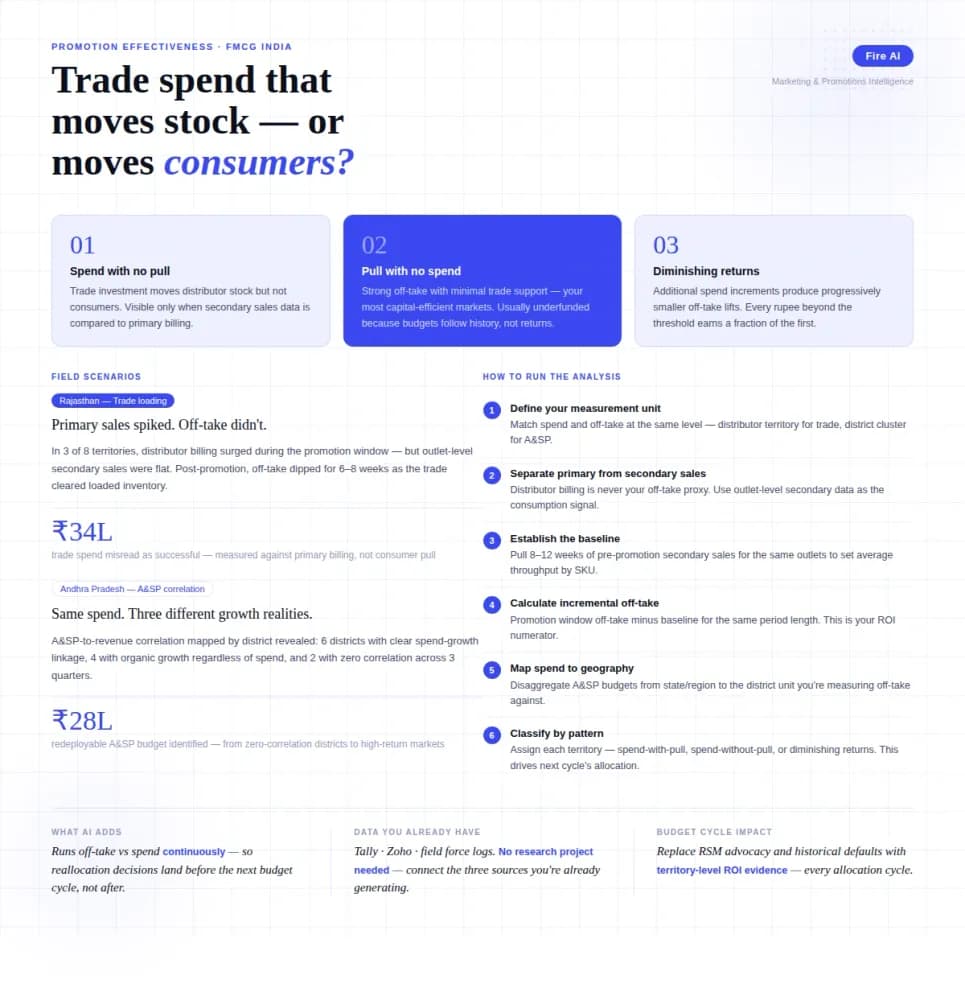
Measuring Promotion Effectiveness: A Data-Driven Guide for FMCG Marketers
FMCG brands in India spend 15–25% of gross revenue on trade promotions and A&SP (advertising and sales promotion) every year. Most can tell you how much they spent. Very few can tell you what it returned. The problem isn't a lack of data — it's that the data lives in disconnected places. Trade spend sits in finance. Off-take data lives with the distributor or field team. A&SP budgets are tracked in a marketing spreadsheet. No single view ties promotional investment to consumer pull at the outlet level. The result is a budget cycle where last year's spend allocation becomes next year's default, because no one has the numbers to argue for something different. This guide walks through how FMCG marketing and trade teams can build a promotion effectiveness framework that actually connects spend to outcome — not just channel-level assumptions.

Democratizing Data: How AI Analytics Levels the Playing Field for Small Businesses and Freelancers
For decades, data-driven decision making was a luxury that only enterprises could afford. Big companies hired data scientists, purchased expensive BI tools, and built complex data warehouses. In exchange, they received precise insights that guided budgets, strategy, and growth.

Closing the Data Decision-Making Gap in Indian Business
Learn how the data decision-making gap stalls growth in Indian enterprises and how causal decision intelligence bridges the analytics gap for teams.