

Quick answer
Indian retailers build sales and inventory dashboards by connecting Tally and POS data to a BI tool like FireAI — tracking daily sales, store performance, inventory turnover, dead stock, and basket size in real time. With native Tally integration, Hindi/English NLQ, and ₹4,999/month flat pricing, even single-store kirana operators get actionable dashboards without technical expertise.
Indian retail — from single-store kirana operators to multi-city chains — generates massive transaction data daily, but most retailers still rely on end-of-day Tally reports or POS summaries that miss the actionable insights hidden in their data.
This guide covers how Indian retailers build effective sales and inventory dashboards.
Essential Retail Dashboards for Indian Businesses
1. Daily Sales Dashboard
The foundation of retail analytics. Track:
- Total sales — daily, weekly, monthly with year-on-year comparison
- Sales by store — for multi-location retailers
- Sales by category and brand — identify top and bottom performers
- Sales by payment mode — cash, UPI, card, credit
- Average transaction value (ATV) and basket size
- Sales per square foot — store productivity metric
Indian retail has unique payment mode dynamics — UPI now accounts for 40–60% of transactions in urban retail. Tracking payment mode mix helps with cash flow planning and reconciliation.
2. Inventory and Stock Dashboard
- Stock turnover ratio by category and SKU
- Days of inventory on hand
- Dead stock — items with no movement in 30/60/90 days
- Stock-to-sales ratio by category
- Reorder alerts for fast-moving items approaching minimum stock
- Ageing analysis — especially critical for perishables and fashion retail
3. Store Performance Dashboard
For multi-store retailers:
- Sales per store — absolute and per square foot
- Footfall and conversion rate by store
- Store-level P&L (revenue minus rent, staff, utilities, shrinkage)
- Staff productivity — sales per employee
- Regional comparison — North vs South vs East vs West performance
4. Customer and Loyalty Dashboard
- Repeat purchase rate — how many customers return within 30/60/90 days
- Top customers by value — identify high-value buyers
- Customer acquisition vs retention split
- Loyalty programme performance — redemption rate, incremental revenue
How to Build Retail Dashboards
Step 1: Map Your Data Sources
Indian retailers typically have:
- Tally or Busy — billing, purchase, stock, financial accounting
- POS system — transaction-level data (Posist, Petpooja for F&B; Ginesys, Vinculum for fashion/general retail)
- E-commerce platforms — Shopify, WooCommerce, Amazon Seller Central
- Manual registers — still common in smaller operations
Step 2: Choose the Right BI Tool
Select a BI tool that:
- Integrates with Tally natively (eliminates manual exports)
- Handles multi-store data consolidation
- Provides mobile-friendly dashboards (store managers check on phones)
- Supports regional languages for staff who operate in Hindi, Tamil, or other languages
Step 3: Start with High-Impact Dashboards
Build in this order of impact:
- Daily sales summary — gives immediate visibility
- Dead stock and slow movers — frees working capital quickly
- Category performance — informs buying decisions
- Store comparison — identifies underperformers for action
Step 4: Automate Reports and Alerts
Set up:
- Morning email report with previous day's sales summary
- Alert when any category drops below minimum stock
- Weekly dead stock report with recommended markdowns
- Monthly store P&L auto-generated from Tally data
India-Specific Retail Analytics Considerations
Festival and seasonal planning: Indian retail sees 30–40% of annual revenue during Diwali, Navratri, Pongal, Onam, and other regional festivals. Dashboards should include year-on-year festival period comparison and pre-season stock adequacy tracking.
Kirana and traditional trade: India's 12 million+ kirana stores are increasingly using Tally or Busy. Even basic analytics — top 50 selling SKUs, dead stock identification, daily sales trend — delivers significant value.
GST reconciliation: Retail analytics should include GST filing-ready reports. Matching POS billing data with Tally entries and GSTR-1 filing helps avoid mismatches and penalties.
Omnichannel tracking: Indian retailers increasingly sell across physical stores, WhatsApp, Instagram, and e-commerce marketplaces. A unified dashboard that tracks all channels prevents siloed reporting and enables accurate total business performance measurement.
Regional price sensitivity: Pricing and promotions that work in Mumbai may not work in Tier-2 cities. Store-level and region-level analytics help retailers tailor their approach.
How FireAI Helps Indian Retail Businesses
FireAI is purpose-built for how Indian retailers actually operate:
- Native Tally integration: Auto-sync sales, purchase, stock, receivables, and GST data. No CSV exports — a ₹5 crore apparel retailer in Indore had live dashboards within 3 hours of connecting Tally
- 700+ connectors: Pull from Gofrugal, Ginesys, Shopify, Amazon Seller Central, and Flipkart alongside Tally for true omnichannel visibility
- NLQ in Hindi and English: A store manager types "आज किस category में सबसे ज़्यादा sales हुई?" and gets instant charts. No training, no SQL, no dependency on IT
- ₹4,999/month flat pricing: Whether you have 3 stores or 30, every store manager, buyer, and owner accesses dashboards for one flat price. Compare: Power BI at ₹844/user × 15 users = ₹1.5 lakh+/year
- Pre-built retail dashboards: Daily sales, dead stock alerts, category performance, footfall conversion, store comparison, and GST reconciliation — ready on day one
- Zero-code alerts: Get WhatsApp/email alerts when any item drops below reorder point, when dead stock exceeds ₹5 lakh, or when daily sales miss target by >20%
Real Indian Retail Scenarios
- Electronics chain in Nagpur (8 stores, ₹25 crore revenue): Connected Tally to FireAI, built store comparison dashboards. Discovered 2 underperforming stores had 40% higher dead stock — targeted clearance sales freed ₹18 lakh in working capital
- Kirana wholesaler in Ahmedabad (₹12 crore revenue): Dead stock dashboard identified ₹8 lakh in non-moving items. SKU rationalisation improved inventory turns from 6x to 9x
- Fashion retailer in Jaipur (3 stores, ₹6 crore revenue): Festival period dashboards helped pre-stock Diwali inventory accurately — resulting in 28% higher festival sales vs previous year with zero excess stock
Ready to act on your data?
See how teams use FireAI to ask in plain language and get analytics they can trust.
Explore FireAI workflows
Go from this topic into product features and solution paths that match what you read here.
Topic hub
Industry Analytics In India
Comparison pages and implementation guidance for industry-specific BI, dashboards, and analytics use cases in India.
Explore hubFrequently asked questions
What KPIs should Indian retailers track on their dashboard?
Key retail KPIs: daily sales by category, average transaction value, basket size, stock turnover (8–12x grocery, 3–5x apparel), dead stock %, sales per sq ft, and gross margin by category. FireAI tracks all of these from Tally automatically — linking sales, purchase, and expense data for a complete profitability view.
How do Indian retailers connect Tally to a sales dashboard?
FireAI provides native Tally integration — install a sync agent, and sales, purchase, stock, and financial data flows into pre-built retail dashboards automatically. No CSV exports or manual uploads. A typical retailer goes live in under 3 hours at ₹4,999/month with no per-user fees.
Can small Indian kirana stores benefit from analytics dashboards?
Yes. Even a single-store kirana using Tally benefits: identify dead stock (free ₹2–5 lakh in locked capital), track top-selling items (optimise buying), monitor daily sales trends, and reconcile GST. FireAI makes this accessible at ₹4,999/month — no technical skills needed, ask questions in Hindi or English.
How does retail analytics handle festival season planning for Indian stores?
FireAI pulls historical Tally data to show year-on-year festival period comparisons (Diwali, Navratri, Pongal). Dashboards highlight which categories spiked, pre-season stock adequacy, and festival-specific margin analysis — helping retailers stock 20–30% more accurately for the next festival season.
What is the best affordable analytics tool for Indian retail chains?
FireAI: native Tally and POS integration (Gofrugal, Ginesys), Hindi/English NLQ queries, 700+ connectors, pre-built retail dashboards, and flat ₹4,999/month pricing. A 10-store chain pays the same as a 2-store operation. Unlike Power BI, no DAX formulas needed — store managers self-serve from day one.
Related in this topic
Retail Analytics in India: Key Metrics & Dashboards
Retail analytics in India covers store-level sales tracking, footfall conversion, inventory turns, and category management. Learn key metrics and dashboards for Indian retail.
7 Best BI Tools in India (2026)
Compare the best business intelligence tools for Indian businesses in 2026. See pricing features and which BI platform fits SMBs mid-market and enterprise.
Tally Analytics: Turn Tally Data into Dashboards & Reports
Get AI-powered analytics and dashboards from Tally Prime data without SQL. FireAI connects to Tally for live GST, sales, inventory, and P&L—no spreadsheet exports.
What is a KPI Dashboard? Definition and Examples
A KPI dashboard is a visual display of key performance indicators that gives business leaders an at-a-glance view of performance against goals. Learn what KPI dashboards include, how to build one, and see examples across sales, finance, and operations.
From the blog

Tally Analytics Dashboards for Indian Businesses
80% of Indian SMBs use Tally. Fewer than 5% have dashboards. Learn how to build real-time P&L, cash flow, and receivables analytics from your Tally Prime data.

Democratizing Data: How AI Analytics Levels the Playing Field for Small Businesses and Freelancers
For decades, data-driven decision making was a luxury that only enterprises could afford. Big companies hired data scientists, purchased expensive BI tools, and built complex data warehouses. In exchange, they received precise insights that guided budgets, strategy, and growth.
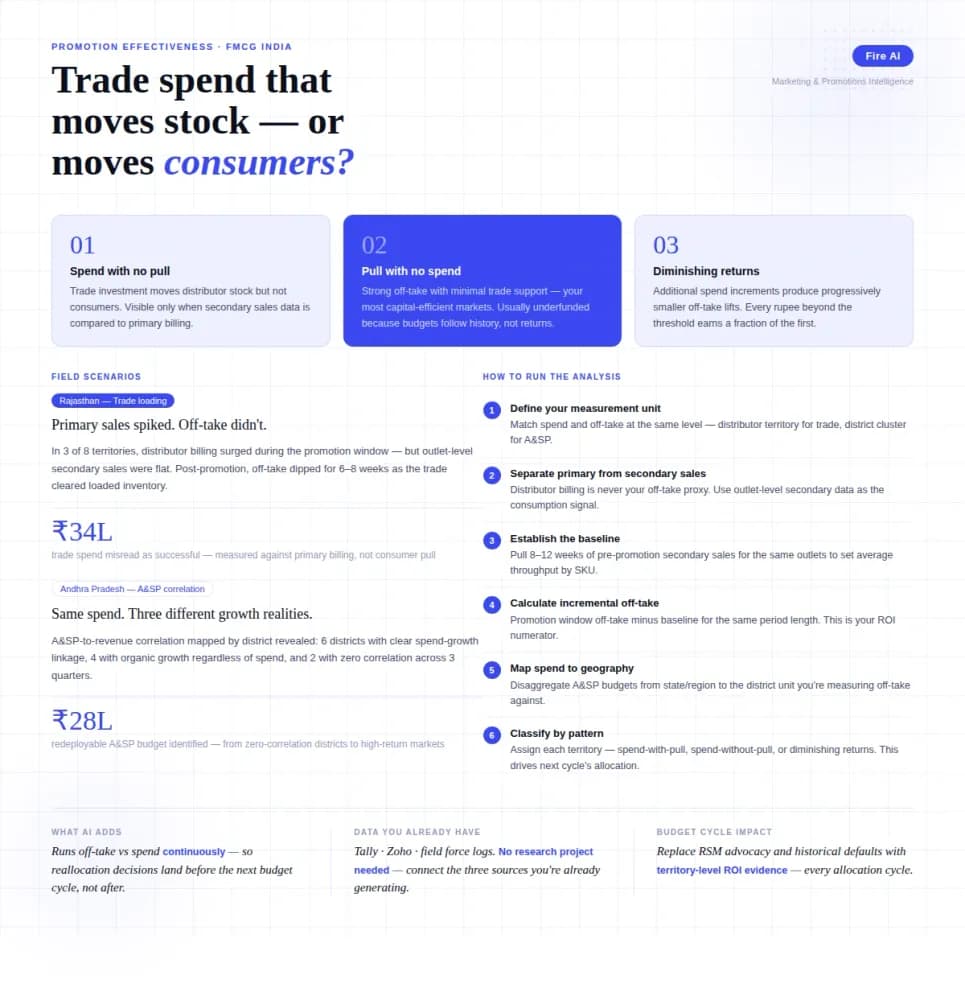
Measuring Promotion Effectiveness: A Data-Driven Guide for FMCG Marketers
FMCG brands in India spend 15–25% of gross revenue on trade promotions and A&SP (advertising and sales promotion) every year. Most can tell you how much they spent. Very few can tell you what it returned. The problem isn't a lack of data — it's that the data lives in disconnected places. Trade spend sits in finance. Off-take data lives with the distributor or field team. A&SP budgets are tracked in a marketing spreadsheet. No single view ties promotional investment to consumer pull at the outlet level. The result is a budget cycle where last year's spend allocation becomes next year's default, because no one has the numbers to argue for something different. This guide walks through how FMCG marketing and trade teams can build a promotion effectiveness framework that actually connects spend to outcome — not just channel-level assumptions.