

Quick answer
Validate AI analytics accuracy by inspecting generated SQL queries, running benchmark tests with known answers, comparing outputs against manual calculations, implementing confidence scoring for uncertain results, and maintaining human-in-the-loop review for high-stakes decisions. Transparency — seeing the SQL behind every answer — is the foundation of trust in AI-powered analytics.
AI analytics produces answers fast, but speed without accuracy is dangerous. A wrong number in a board presentation or an incorrect trend in a financial report erodes trust in the entire system. Validating AI analytics accuracy requires a systematic approach — not spot-checking, but a repeatable framework that builds justified confidence.
Why Validation Matters More for AI Analytics
Traditional BI tools execute hand-written SQL. If the number is wrong, the analyst reviews their query. AI analytics introduces a translation layer — natural language to SQL — where errors can be subtle:
- The AI selects the wrong table (using
quotesinstead ofinvoicesfor revenue) - A join condition is technically valid but semantically wrong (joining on the wrong key)
- Aggregation logic is slightly off (averaging when it should sum, or excluding NULL values)
- Date filters use calendar year when the business operates on a fiscal year
- Business term interpretation differs from the user's intent ("active customers" might mean different things)
These errors produce plausible-looking results. The chart renders, the numbers look reasonable, but they are subtly wrong. Validation catches these before decisions are made.
Step 1: Query Transparency
The first and most fundamental validation mechanism is seeing the generated query.
Show the SQL
Every AI analytics platform should expose the SQL (or query logic) it generates. When a user asks "What was revenue last quarter?", they should see:
SELECT SUM(total_amount) AS revenue
FROM orders
WHERE order_date BETWEEN '2026-10-01' AND '2026-12-31'
AND status = 'completed'
This allows anyone with basic data literacy to verify:
- Is
total_amountthe right column for revenue? - Is the date range correct for "last quarter"?
- Should cancelled orders be excluded?
Show Term Mappings
Beyond SQL, show how business terms were interpreted: "Revenue" → SUM(orders.total_amount), "last quarter" → Oct 1 – Dec 31 2026. This surfaces interpretation errors that SQL alone might not reveal.
Step 2: Benchmark Test Suites
Create a curated set of questions with known correct answers, and run them regularly.
Building a Test Suite
- Identify critical metrics: Revenue, customer count, order volume, conversion rate — the numbers that drive decisions
- Write 20–50 natural language questions covering these metrics with various filters, time ranges, and aggregations
- Calculate the correct answer manually (or via verified SQL) for each question
- Score the AI system: Run all questions through the natural language interface and compare output to expected results
Test Categories
| Category | Example Question | Validation Focus |
|---|---|---|
| Simple aggregation | "Total revenue this month" | Correct table, column, date range |
| Filtered aggregation | "Revenue from enterprise customers in North region" | Correct filter logic and combinations |
| Comparison | "Revenue this quarter vs last quarter" | Correct date arithmetic and comparison logic |
| Ranking | "Top 5 products by units sold" | Correct ordering and limit |
| Ratio/calculation | "Average order value by customer segment" | Correct aggregation and grouping |
| Multi-join | "Revenue by product category and sales rep" | Correct join paths |
Scoring
Track accuracy across dimensions:
- Exact match: Result matches expected answer within rounding tolerance
- Partial match: Correct structure but wrong filter or date range
- Semantic miss: Completely wrong interpretation of the question
- Graceful failure: System declines to answer rather than guessing
A well-tuned system should achieve 90%+ exact match on common query patterns and graceful failure (rather than wrong answers) on the remainder.
Step 3: Statistical Validation
For numerical results, apply statistical sanity checks:
Range Validation
AI analytics output should fall within expected ranges. If monthly revenue has historically been ₹50 lakhs – ₹1.2 crore, an AI result of ₹15 crore should trigger an automatic flag. Implement bounds checking based on historical data distributions.
Cross-Metric Consistency
Related metrics should be internally consistent:
- Revenue = Units × Average Price (approximately)
- Total customers ≥ Customers who placed orders
- Year-to-date = Sum of monthly figures
If AI results violate these identities, something is wrong with the query logic.
Trend Continuity
AI results for time-series data should not show impossible discontinuities unless a known event explains them. A 500% week-over-week revenue spike warrants investigation, not automatic acceptance.
Step 4: Confidence Scoring
Not all AI-generated queries deserve equal trust. Implement confidence scoring:
High Confidence (Green)
- Question maps cleanly to schema with no ambiguity
- Query pattern has been validated before
- Single table or simple join
- Result falls within expected range
Medium Confidence (Yellow)
- Some term ambiguity resolved by default business rules
- Complex join or subquery required
- First time this query pattern has been generated
- Result is at the edge of expected range
Low Confidence (Red)
- Multiple possible interpretations of the question
- Schema context retrieval returned low-relevance results
- Very complex multi-step calculation
- Result is outside expected range
Users should see these confidence indicators alongside every result. Low-confidence results should include a recommendation to verify with a manual query or data team review.
Step 5: Human-in-the-Loop Review
For high-stakes outputs, maintain human validation:
Critical Decision Checkpoints
Define which analytics outputs require human review before action:
- Financial reporting numbers (board decks, investor updates)
- Regulatory compliance metrics
- Customer-facing data (pricing, SLA reporting)
- Strategic planning inputs (market sizing, forecasting)
Feedback Loops
Enable users to flag incorrect results. Each flag should:
- Record the question, generated SQL, and result
- Record the user's expected answer or correction
- Feed back into the system to improve future accuracy
- Update the benchmark test suite with new test cases
Periodic Audits
Monthly or quarterly, have a data-literate team member run the benchmark test suite, review flagged results, and assess overall accuracy trends. Track accuracy over time — it should improve, not degrade.
Step 6: Platform-Level Safeguards
The AI analytics platform itself should implement technical safeguards:
Query Validation
Before executing generated SQL:
- Verify all table and column references exist in the schema
- Check that join conditions reference valid foreign key relationships
- Validate that aggregation functions are appropriate for the column data types
- Ensure WHERE clause values are within plausible ranges
Result Validation
After execution:
- Check for empty results (might indicate a wrong filter)
- Verify row counts are within expected range
- Flag NULL-heavy results that might indicate a join issue
- Compare execution time to expected range (unusually slow queries might indicate a Cartesian join)
Audit Logging
Log every AI-generated query with: the original question, retrieved context, generated SQL, execution result, and confidence score. This audit trail enables post-hoc investigation and continuous improvement.
Building Trust Over Time
Trust in AI analytics is not binary — it is earned incrementally. Start with low-stakes queries (ad-hoc exploration), validate against known answers, gradually expand to operational reporting, and finally to financial and strategic decisions. Each stage adds confidence based on evidence.
FireAI supports this trust-building approach with transparent query logic — showing the generated SQL behind every answer so users can verify how their question was interpreted.
How FireAI Ensures Accuracy for Indian Businesses
FireAI implements multiple layers of validation specifically designed for Indian business data:
Tally Schema Awareness
FireAI's AI is pre-trained on Tally Prime's ledger structure — understanding the difference between "Sales Account" and "Purchase Account" groups, GST ledger hierarchies, and Indian accounting conventions. This eliminates the most common source of errors: wrong table or column selection.
Indian Fiscal Year and GST Context
When a user asks "What was revenue last quarter?", FireAI correctly interprets this as the Indian fiscal quarter (April–March calendar), not the calendar quarter. GST-related queries automatically reference the correct CGST/SGST/IGST ledgers and match GSTR-1 reporting periods.
Practical Validation Example
A ₹25 crore manufacturing company in Coimbatore validated FireAI's accuracy by comparing its first 50 queries against manual Tally reports:
- 46 out of 50 queries returned exact matches (92% accuracy)
- 3 queries had minor differences due to Tally voucher date vs posting date interpretation — resolved by clarifying business rules
- 1 query was declined by the system (graceful failure) rather than returning a wrong answer
After the initial calibration, the company now relies on FireAI for daily operational analytics and monthly board reporting.
Step-by-Step Validation Checklist for Your Business
- Run 10 known-answer queries — Compare FireAI results against your Tally reports for last month's revenue, top customers, and expense breakdowns
- Check the SQL — Click "Show Query" on each result to verify the AI selected the right tables and filters
- Test edge cases — Try queries with date ranges, currency filters, and multi-company scenarios
- Set up alerts — Configure anomaly thresholds so the system flags results outside expected ranges
- Build a benchmark library — Save validated queries as benchmarks and re-run monthly to track accuracy trends
See augmented analytics to understand how AI assists without replacing human judgment.
Ready to act on your data?
See how teams use FireAI to ask in plain language and get analytics they can trust.
Explore FireAI workflows
Go from this topic into product features and solution paths that match what you read here.
Topic hub
AI Analytics
Guides on natural language querying, AI-powered analytics, forecasting, anomaly detection, and automated insights.
Explore hubFrequently asked questions
How accurate is AI analytics compared to manual SQL?
Well-implemented AI analytics systems achieve 85–95% accuracy on common query patterns — matching or exceeding the accuracy of manual SQL written by non-expert users (who also make errors in joins, filters, and aggregations). The key difference is that AI errors are systematic and detectable through benchmark testing, while human errors are unpredictable.
What causes AI analytics to produce wrong results?
The most common causes are ambiguous business terms (the AI interprets "sales" differently than the user intended), incorrect schema mapping (selecting the wrong table or column), date range misinterpretation (calendar year vs fiscal year), and missing context (not knowing that cancelled orders should be excluded). Query transparency and benchmark testing catch these issues.
Should I trust AI analytics for financial reporting?
AI analytics can accelerate financial reporting by generating initial queries and surfacing anomalies, but high-stakes financial numbers should include human validation before publication. Use AI for draft analysis and exploration, then verify critical figures through established review processes. Over time, as accuracy is demonstrated through benchmarks, the verification burden decreases.
How do I validate AI analytics accuracy against my Tally data?
Run 10-20 known-answer queries comparing FireAI output against your Tally reports — revenue totals, customer balances, expense breakdowns. Check the generated SQL to verify correct ledger group selection and date ranges. Most businesses achieve 90%+ accuracy after initial calibration of business term definitions (e.g., what counts as "revenue" in your specific Tally setup).
What is a confidence score in AI analytics and why does it matter?
A confidence score indicates how certain the AI is about its interpretation of your question. High-confidence queries map cleanly to your data schema with no ambiguity. Low-confidence results mean the system found multiple interpretations or complex join paths. Always verify low-confidence results manually before making business decisions based on them.
Related in this topic
Natural Language BI: Ask Questions, Get Charts
Discover how natural language BI lets anyone ask data questions in plain English and get instant charts and answers. No SQL, no dashboard building required.
What is AI-Powered Business Intelligence?
AI-powered business intelligence integrates AI and machine learning with traditional BI to automate insights, enable natural language queries, and provide predictive analytics. Learn how AI BI works, which features matter, and how businesses use it.
What is Augmented Analytics? Definition and Benefits
Augmented analytics uses AI and machine learning to automate data preparation, insight discovery, and natural language generation. Learn how augmented analytics works, which benefits it provides, and see real examples of automated insights.
AI Dashboard: What It Is & How It Works (2026)
An AI dashboard auto-generates charts, flags anomalies, and answers questions in plain English — no SQL or manual setup. See how AI dashboards differ from traditional BI and which tools offer them.
From the blog
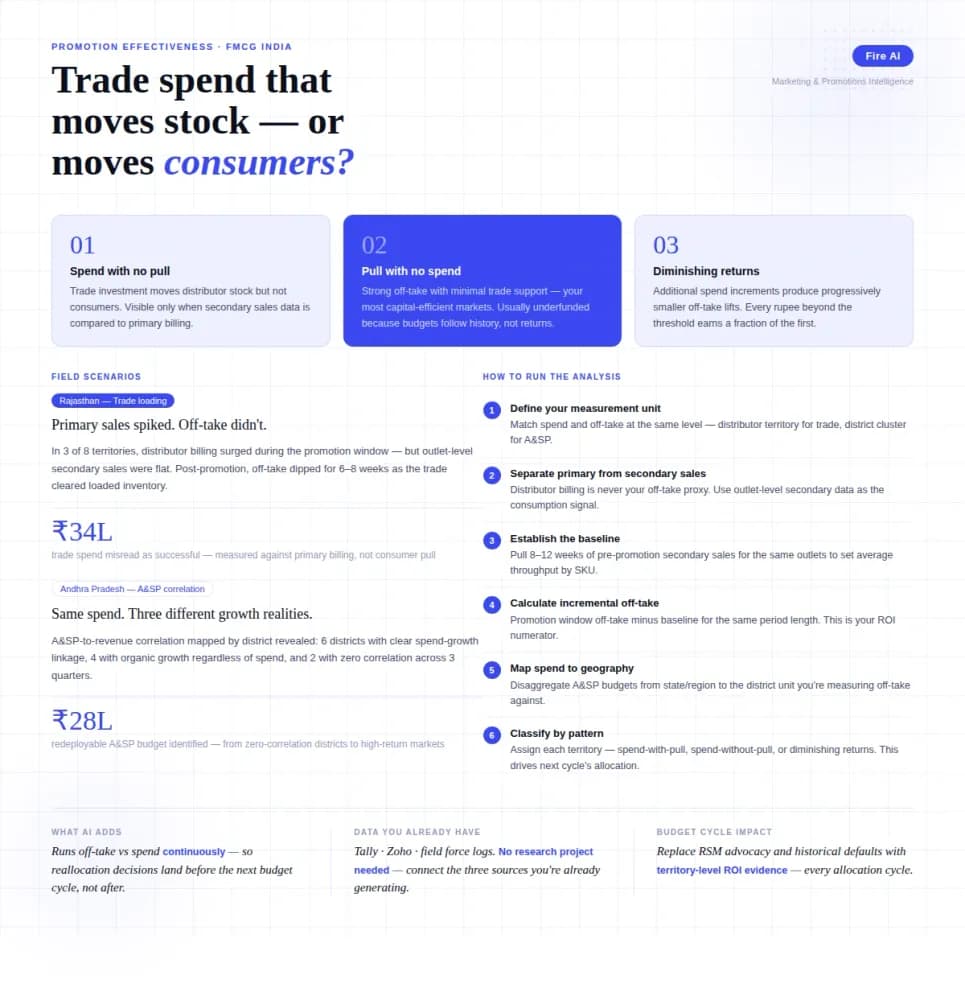
Measuring Promotion Effectiveness: A Data-Driven Guide for FMCG Marketers
FMCG brands in India spend 15–25% of gross revenue on trade promotions and A&SP (advertising and sales promotion) every year. Most can tell you how much they spent. Very few can tell you what it returned. The problem isn't a lack of data — it's that the data lives in disconnected places. Trade spend sits in finance. Off-take data lives with the distributor or field team. A&SP budgets are tracked in a marketing spreadsheet. No single view ties promotional investment to consumer pull at the outlet level. The result is a budget cycle where last year's spend allocation becomes next year's default, because no one has the numbers to argue for something different. This guide walks through how FMCG marketing and trade teams can build a promotion effectiveness framework that actually connects spend to outcome — not just channel-level assumptions.

Democratizing Data: How AI Analytics Levels the Playing Field for Small Businesses and Freelancers
For decades, data-driven decision making was a luxury that only enterprises could afford. Big companies hired data scientists, purchased expensive BI tools, and built complex data warehouses. In exchange, they received precise insights that guided budgets, strategy, and growth.

How a Modern Analytics Platform Transforms Business Intelligence
Why faster decision-making, real-time analytics, and AI-driven intelligence separate market leaders from laggards—and how Fire AI closes the gap between data and action.