

Quick answer
Yes. FireAI's one-click Tally connector securely syncs on-premise Tally Prime data to cloud dashboards with zero-code setup and real-time auto-sync. This enables visual dashboards on any device, mobile access, shared team views, NLQ (natural language queries), and automated reporting — while Tally continues running locally as usual.
Yes — Tally Prime can connect to cloud-based dashboard tools, and FireAI's one-click connector makes this as simple as installing an app. You get real-time dashboards accessible from any browser or mobile device, shared team access, pre-built dashboard templates, NLQ (natural language queries), and automated reports — all powered by the data already in your Tally, with zero-code setup.
This is one of the most common questions from Indian business owners: "My Tally runs on a local computer. Can I still get cloud dashboards?" The answer is yes. A ₹10 Cr manufacturer in Pune can have their P&L, receivables, and inventory dashboards live on their phone within 30 minutes of connecting — no Excel exports, no IT team.
How the Tally-to-Cloud Connection Works
Tally Prime is an on-premise application — it runs on your computer or local server. Cloud dashboards live on the internet. The bridge between them is a connector application.
Architecture
Tally Prime (your computer) → Tally Connector → Encrypted Transfer → Cloud BI Platform → Dashboard (any device)
Step-by-step (FireAI's one-click setup):
- Tally runs locally on your desktop or server as it always has
- Install FireAI's one-click connector alongside Tally — zero-code, under 5 minutes
- The connector auto-syncs vouchers, ledgers, stock items, and master data from Tally in real time
- Data transfers securely via encrypted HTTPS connection to Indian data centres
- Pre-built dashboard templates (P&L, sales, receivables, inventory) are ready instantly on any browser or mobile device
- Real-time auto-sync keeps dashboards current — only new or changed data transfers after the initial sync
What Stays Local
- Tally application and company data remain on your machine
- The connector does not modify your Tally data
- Your Tally operations (voucher entry, reports) are unaffected
What Goes to the Cloud
- A structured copy of your transaction data (sales, purchases, inventory, ledgers)
- This data powers the dashboards and analytics on the cloud platform
- Data is encrypted in transit and at rest
What Cloud Dashboards Enable
| Capability | Tally On-Premise | Tally + Cloud Dashboard |
|---|---|---|
| Access from any device | ❌ Only on Tally machine | ✅ Any browser or mobile |
| Visual dashboards | ❌ Text-based reports | ✅ Charts, graphs, KPI cards |
| Share with team | ❌ Export and email | ✅ Live shared dashboards |
| Share with CA/auditor | ❌ Print or email reports | ✅ View-only dashboard links |
| Mobile access | ❌ Desktop only | ✅ Full mobile dashboard |
| Automated reports | ❌ Manual generation | ✅ Scheduled delivery |
| Natural language queries | ❌ Not available | ✅ Ask questions in English/Hindi |
| Multi-company consolidation | ❌ One company at a time | ✅ Unified cross-company view |
| AI-powered alerts | ❌ None | ✅ Proactive notifications |
| Historical trend analysis | ❌ One period at a time | ✅ Multi-year visual trends |
Common Concerns About Cloud Connection
"Is my data safe in the cloud?"
Legitimate concern. Here's what reputable platforms provide:
- Encryption in transit — data travels via HTTPS/TLS, same security as online banking
- Encryption at rest — data stored with AES-256 encryption
- Indian data residency — data stored in Indian data centres (AWS Mumbai, Azure India)
- Access controls — role-based permissions, only authorised users see dashboards
- No data sharing — your business data is never shared with third parties or used for AI training
- Audit logs — complete record of who accessed what and when
"Will it slow down my Tally?"
No. The connector reads data in the background using minimal system resources. It doesn't interfere with Tally's core operations — voucher entry, report generation, and data backup all continue normally.
"What if my internet goes down?"
- Tally continues working offline as always — it's local software
- The connector queues any pending sync and resumes when internet returns
- Dashboards show the last-synced data until the connection restores
- No data is lost
"Do I need a static IP or special network setup?"
No. The connector initiates an outbound HTTPS connection — same as opening a website. No inbound ports, no static IP, no VPN, no special firewall rules needed in most cases.
Use Cases for Cloud Dashboards from Tally
Business Owner on the Move
A ₹25 Cr textile manufacturer in Surat checks his sales dashboard on his phone while travelling. Real-time revenue, top customers, and cash position — all from Tally data. He uses NLQ to type "Show today's sales vs yesterday" and gets an instant chart. No laptop, no Tally access needed.
Multi-Branch Visibility
A ₹40 Cr pharma distributor with 5 branches across Gujarat runs separate Tally companies for each branch. FireAI's cloud dashboards consolidate all 5 into one view — total inventory worth ₹8 Cr, combined receivables of ₹6 Cr, branch-wise profitability — all updated in real time.
CA and Auditor Collaboration
Instead of emailing Excel files to the CA every quarter, the business shares a view-only FireAI dashboard link. The CA sees live P&L, balance sheet, and trial balance data from Tally — always current, no back-and-forth. This alone saves 2–3 days of data collection per quarter.
Remote Finance Team
Post-COVID, many finance teams work partially from home. Cloud dashboards from Tally give them access to all financial data without needing remote desktop connections to the Tally machine.
Which Cloud Dashboard Tools Work with Tally?
| Tool | Tally Connection Method | Real-Time Sync | Pre-Built Templates | Indian Support |
|---|---|---|---|---|
| FireAI | Native connector | ✅ Yes | ✅ Yes | ✅ Local team, IST |
| Power BI | Third-party ODBC | ⚠️ Scheduled refresh | ❌ Manual build | ❌ Global support |
| Tableau | Third-party connector | ⚠️ Scheduled refresh | ❌ Manual build | ❌ Global support |
| Zoho Analytics | Manual import/API | ⚠️ Periodic import | ❌ Manual build | ✅ India-based |
| Google Looker Studio | Manual CSV upload | ❌ Manual only | ❌ Manual build | ❌ No local support |
FireAI offers a one-click, zero-code Tally connector with real-time auto-sync and pre-built dashboard templates — plus NLQ for instant ad-hoc questions. It also supports 700+ other data sources for businesses that need to combine Tally data with CRM, e-commerce, or other systems.
Getting Started
If you're running Tally Prime and want cloud dashboards:
- Sign up for FireAI — free trial available, no credit card required
- Install the one-click Tally connector — zero-code setup, under 5 minutes
- Run it alongside Tally — it auto-detects your Tally company
- Real-time auto-sync begins — initial data transfer takes a few minutes depending on company size
- Pre-built dashboards are ready — P&L, sales, receivables, inventory templates available instantly
- Ask your first NLQ question — try "What's my cash position right now?" from any device
Your Tally data is now in the cloud — securely, automatically, and always current. See the full capabilities at Tally analytics with FireAI.
Ready to act on your data?
See how teams use FireAI to ask in plain language and get analytics they can trust.
Explore FireAI workflows
Go from this topic into product features and solution paths that match what you read here.
Topic hub
Tally Analytics
Analytics for Tally Prime and Tally ERP — one of 700+ data sources FireAI connects to — including dashboards, reporting, GST, and finance workflows.
Explore hubFrequently asked questions
Can Tally Prime connect to a cloud BI tool without changing my Tally setup?
Yes. FireAI's one-click connector runs alongside Tally on your existing machine with zero-code setup. It reads data via real-time auto-sync and sends it to the cloud platform. Your Tally installation, company data, and workflows remain completely unchanged.
Is it safe to send Tally data to a cloud dashboard platform?
Yes. FireAI uses HTTPS encryption for data transfer, AES-256 encryption for storage, Indian data residency (AWS Mumbai), and role-based access controls. Your data is never shared with third parties or used for model training.
Can I access Tally dashboards on my mobile phone?
Yes. Once Tally is connected via FireAI's one-click connector, all dashboards are accessible from any mobile browser. Business owners commonly use this to check sales, cash flow, and receivables while travelling — and NLQ lets you ask questions directly from your phone.
What happens to my cloud dashboards if my internet connection drops?
Tally continues working offline as always. FireAI's connector queues pending sync and resumes automatically when internet returns. Dashboards show the last-synced data until the connection restores. No data is lost.
Can my CA or auditor access Tally dashboards without installing Tally?
Yes. FireAI supports shared view-only dashboard links. Your CA can see live P&L, balance sheet, and trial balance data from Tally in any browser — always current, no Tally installation or Excel exports needed. This saves days of back-and-forth data collection each quarter.
Related in this topic
Tally Analytics: Turn Tally Data into Dashboards & Reports
Get AI-powered analytics and dashboards from Tally Prime data without SQL. FireAI connects to Tally for live GST, sales, inventory, and P&L—no spreadsheet exports.
Can AI Work with Tally Prime and ERP 9 Data?
Yes — AI can connect directly to Tally Prime and Tally ERP 9 to deliver instant dashboards, natural language queries, and automated insights on your financial, sales, and inventory data. Learn how AI analytics works with Tally data.
How to Connect Tally to a BI Tool for Dashboard Reporting
Step-by-step guide to connecting Tally Prime and ERP 9 to a BI tool for live dashboards, automated reporting, and visual analytics without manual CSV exports.
Tally Dashboard: Live Sales, GST & Finance Views
A Tally dashboard turns your Tally Prime data into live charts for sales, GST, receivables, inventory, and P&L — updated automatically. See examples, key metrics, and how to set one up.
From the blog

Tally Analytics Dashboards for Indian Businesses
80% of Indian SMBs use Tally. Fewer than 5% have dashboards. Learn how to build real-time P&L, cash flow, and receivables analytics from your Tally Prime data.
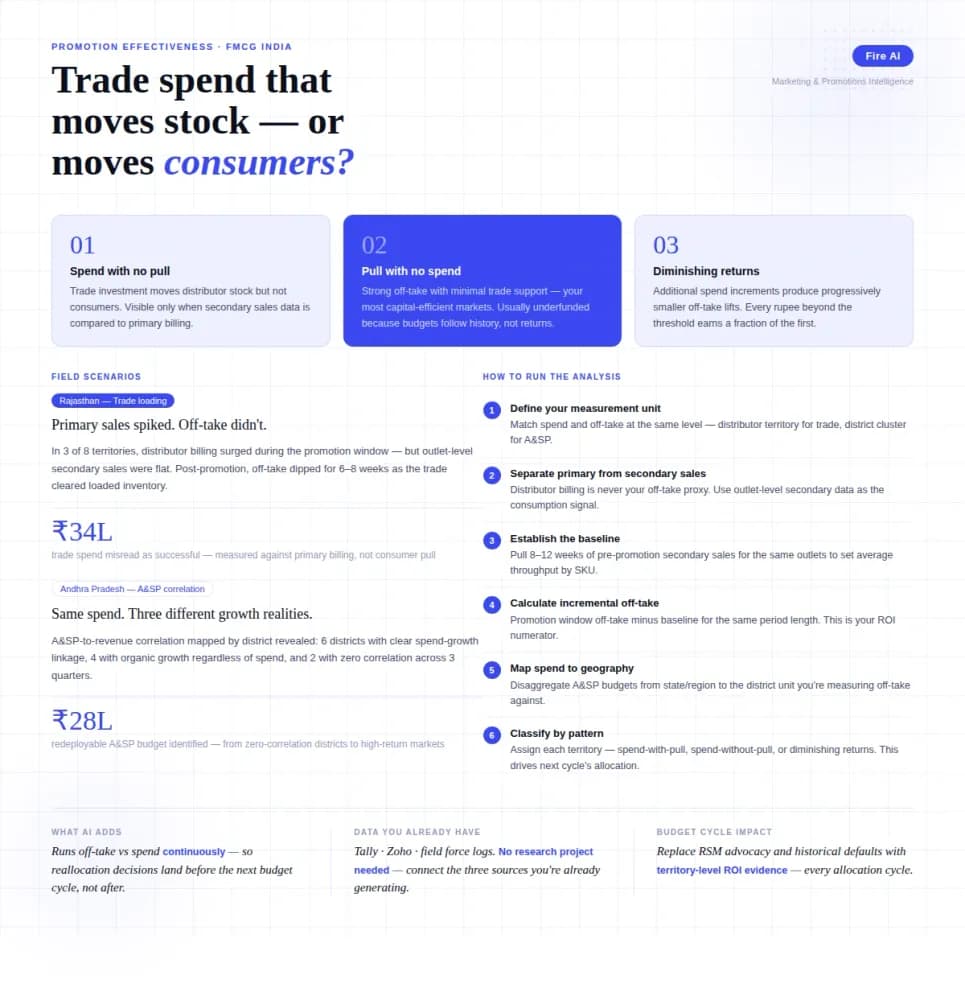
Measuring Promotion Effectiveness: A Data-Driven Guide for FMCG Marketers
FMCG brands in India spend 15–25% of gross revenue on trade promotions and A&SP (advertising and sales promotion) every year. Most can tell you how much they spent. Very few can tell you what it returned. The problem isn't a lack of data — it's that the data lives in disconnected places. Trade spend sits in finance. Off-take data lives with the distributor or field team. A&SP budgets are tracked in a marketing spreadsheet. No single view ties promotional investment to consumer pull at the outlet level. The result is a budget cycle where last year's spend allocation becomes next year's default, because no one has the numbers to argue for something different. This guide walks through how FMCG marketing and trade teams can build a promotion effectiveness framework that actually connects spend to outcome — not just channel-level assumptions.

Democratizing Data: How AI Analytics Levels the Playing Field for Small Businesses and Freelancers
For decades, data-driven decision making was a luxury that only enterprises could afford. Big companies hired data scientists, purchased expensive BI tools, and built complex data warehouses. In exchange, they received precise insights that guided budgets, strategy, and growth.