

Quick answer
Yes. FireAI's one-click Tally connector links AI directly to Tally Prime and ERP 9 with zero-code setup. It delivers pre-built dashboards, natural language queries (NLQ) in English or Hindi, anomaly alerts, and financial insights — all in real time without Excel exports or SQL. Your Tally data powers AI analytics the moment you connect.
Yes — AI analytics can work directly with your Tally data, in real time, without any manual exports or technical setup. FireAI's one-click Tally connector makes this possible with zero-code setup and real-time auto-sync.
Tally is the accounting and ERP backbone of millions of Indian businesses. But Tally's built-in reports, while accurate, have significant limits: they're static, hard to customise, lack visual dashboards, and can't answer ad-hoc questions. A ₹15 Cr distributor's finance team spending 4 hours every Monday building MIS reports from Tally exports is a productivity drain that AI analytics eliminates entirely.
How AI Works with Tally Data
Real-Time Tally Connection via One-Click Connector
FireAI connects directly to Tally Prime and Tally ERP 9 through a one-click, zero-code connector. This means:
- Data flows automatically via real-time auto-sync — no manual CSV exports
- Your dashboard reflects Tally entries as they're posted
- Sales, purchases, inventory, payables, receivables, and ledger data are all accessible
- Pre-built dashboard templates are ready the same day
Natural Language Queries (NLQ) on Tally Data
Once connected, FireAI's NLQ engine lets you ask your Tally data questions in plain English or Hindi:
- "What was my gross profit margin last quarter?"
- "Show me outstanding receivables over ₹5 lakh for more than 60 days"
- "Which product line had the highest growth this month?"
- "Compare this year's expenses to last year by category"
- "पिछले महीने की बिक्री दिखाओ"
The AI reads your Tally data and answers instantly — no SQL, no pivot tables, no waiting for an accountant to run a report. A ₹20 Cr manufacturer's owner can type a question on their phone during a meeting and get a visual answer in seconds.
Pre-Built Dashboard Templates from Tally
FireAI provides pre-built dashboard templates that work instantly with your Tally data:
- P&L dashboard — Revenue, expenses, gross margin, net profit
- Cash flow dashboard — Cash in, cash out, net position, receivables vs payables
- Sales dashboard — Top customers, top products, revenue by region and rep
- Inventory dashboard — Stock levels, fast-moving items, slow-moving items, reorder alerts
- Receivables dashboard — Ageing buckets, DSO tracking, collection alerts
See Tally analytics with FireAI for a full breakdown of available dashboards.
Proactive Alerts on Tally Metrics
AI doesn't just wait for you to look at the dashboard — it monitors your Tally data and proactively alerts you when:
- A large payment is overdue beyond your threshold
- Cash balance drops below your set minimum
- A specific expense category exceeds budget
- Inventory for a fast-moving item falls below reorder level
This is the difference between reactive reporting and proactive AI analytics.
What Tally Data Can AI Analyse?
| Data Type | AI Analytics Capability |
|---|---|
| Sales Vouchers | Revenue analysis, top customers, product mix, trends |
| Purchase Vouchers | Vendor analysis, cost tracking, price trends |
| Ledger Data | P&L, balance sheet, expense categorisation |
| Inventory | Stock levels, turnover, dead stock, reorder points |
| Receivables/Payables | Ageing analysis, DSO, DPO, collection efficiency |
| Payroll | Headcount costs, department expenses |
| GST Data | GST liability, input credit analysis |
Does AI Work with Tally Prime and Tally ERP 9?
Yes — AI analytics tools like FireAI support both:
- Tally Prime (current version) — real-time, native integration
- Tally ERP 9 (older version) — supported via compatible connection
You don't need to upgrade your Tally version to use AI analytics.
Can I Use AI with Tally Without a Technical Team?
Yes. FireAI's one-click Tally connector is specifically designed for business owners and finance teams, not developers. The zero-code setup typically takes:
- Install FireAI's one-click Tally connector (under 5 minutes, zero-code)
- Authenticate with your Tally company data (2 minutes)
- Real-time auto-sync begins and pre-built dashboard templates are ready instantly
No database setup, no API configuration, no ODBC, no IT department required. A ₹5 Cr business owner can set this up themselves in one tea break.
What About Data Security?
A common concern when connecting Tally to any external system is data security. Reputable AI analytics platforms process your data with enterprise-grade encryption, comply with Indian data residency requirements, and never share your business data with third parties.
Always verify that the platform you choose:
- Stores data in India or allows you to choose your data region
- Uses encrypted connections for data transfer
- Has clear data usage and privacy policies
The Bottom Line
Yes, AI can work with Tally data — and it dramatically improves what you can do with it. Instead of static reports you have to manually generate, you get live dashboards, instant NLQ answers, and proactive alerts. FireAI's one-click connector, zero-code setup, real-time auto-sync, and pre-built templates mean a ₹10 Cr business can go from Tally-only to full AI analytics in under 30 minutes. It's the analytical power of a full data team, available to any Indian business.
Learn why Tally users need BI and see how to connect Tally to BI to get started.
Ready to act on your data?
See how teams use FireAI to ask in plain language and get analytics they can trust.
Explore FireAI workflows
Go from this topic into product features and solution paths that match what you read here.
Topic hub
Tally Analytics
Analytics for Tally Prime and Tally ERP — one of 700+ data sources FireAI connects to — including dashboards, reporting, GST, and finance workflows.
Explore hubFrequently asked questions
Can AI read my Tally data automatically without manual exports?
Yes. FireAI's one-click Tally connector syncs data from Tally Prime and ERP 9 in real time via auto-sync. Once connected, it continuously reads your sales, purchase, inventory, and financial data and updates pre-built dashboards automatically — no CSV exports, no Excel, no manual intervention.
Do I need to export Tally data to Excel for AI analysis?
No. FireAI's native Tally connector pulls data directly with zero-code setup. This keeps your analysis current and eliminates the manual export-import cycle that costs most Tally users 15–20 hours per month.
Can I ask questions in Hindi about my Tally data using AI?
Yes. FireAI's NLQ (natural language query) engine supports Hindi and English. A business owner can type "पिछले महीने की बिक्री दिखाओ" or "Show outstanding above ₹5 lakh" and get instant visual results from their Tally data.
Does AI analytics work with both Tally Prime and Tally ERP 9?
Yes. FireAI supports both Tally Prime (current version) and Tally ERP 9. You do not need to upgrade your Tally software to use AI analytics — the one-click connector works with both versions.
Is it safe to connect my Tally data to an AI analytics tool?
Yes. FireAI uses HTTPS encryption for data transfer, AES-256 encryption for storage, Indian data residency (AWS Mumbai), and role-based access controls. Your Tally data is never shared with third parties or used for model training.
Related in this topic
Tally Analytics: Turn Tally Data into Dashboards & Reports
Get AI-powered analytics and dashboards from Tally Prime data without SQL. Learn the key metrics, examples and practical business uses.
Natural Language BI: Ask Questions, Get Charts
Learn how natural language BI lets anyone ask data questions in plain English and get instant charts and answers. See key metrics and practical uses.
Can AI Detect Accounting Errors in Tally Data?
Learn how AI can detect accounting errors, duplicate entries, misclassified ledgers, and anomalies in Tally Prime data for Indian businesses. Practical use cases inside.
Can AI Automate GST Reconciliation from Tally Data?
Yes — AI can automate GST reconciliation by matching your Tally purchase register against GSTR-2B data, flagging mismatches, and tracking ITC discrepancies in real time.
From the blog
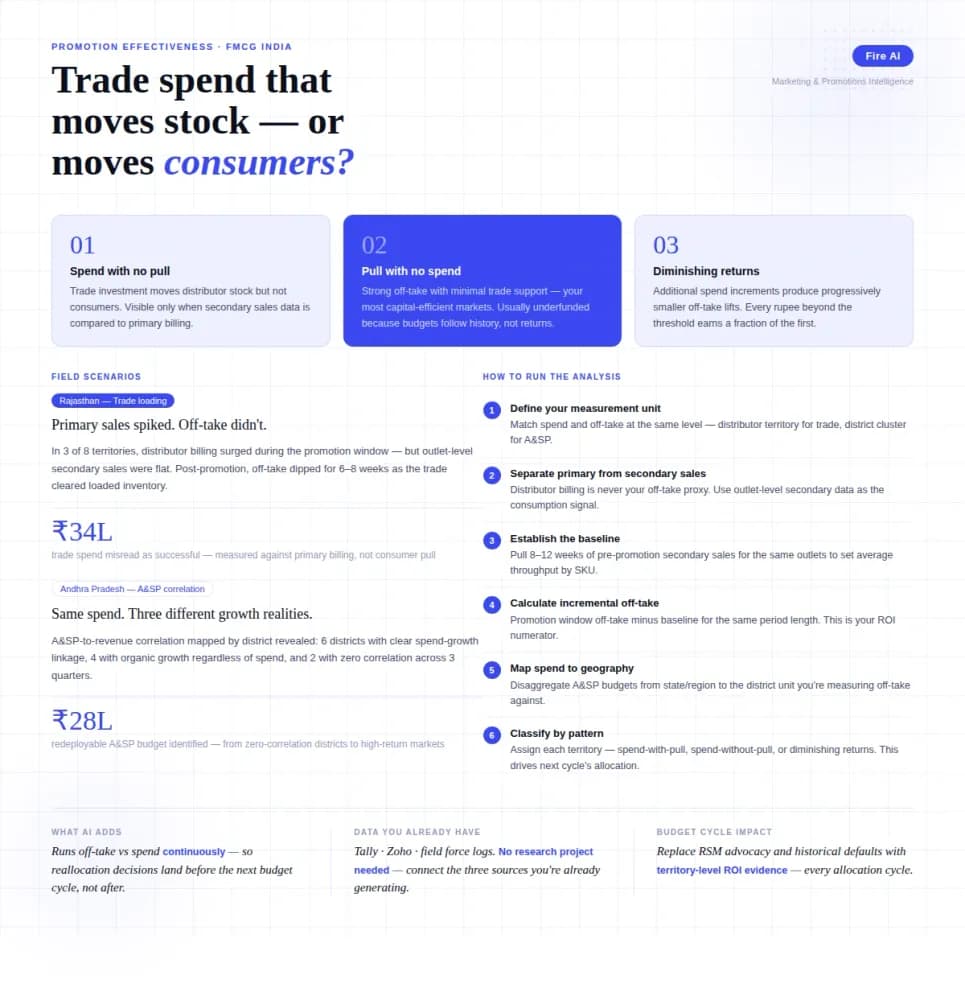
Measuring Promotion Effectiveness: A Data-Driven Guide for FMCG Marketers
FMCG brands in India spend 15–25% of gross revenue on trade promotions and A&SP (advertising and sales promotion) every year. Most can tell you how much they spent. Very few can tell you what it returned. The problem isn't a lack of data — it's that the data lives in disconnected places. Trade spend sits in finance. Off-take data lives with the distributor or field team. A&SP budgets are tracked in a marketing spreadsheet. No single view ties promotional investment to consumer pull at the outlet level. The result is a budget cycle where last year's spend allocation becomes next year's default, because no one has the numbers to argue for something different. This guide walks through how FMCG marketing and trade teams can build a promotion effectiveness framework that actually connects spend to outcome — not just channel-level assumptions.

Tally Analytics Dashboards for Indian Businesses
80% of Indian SMBs use Tally. Fewer than 5% have dashboards. Learn how to build real-time P&L, cash flow, and receivables analytics from your Tally Prime data.

Democratizing Data: How AI Analytics Levels the Playing Field for Small Businesses and Freelancers
For decades, data-driven decision making was a luxury that only enterprises could afford. Big companies hired data scientists, purchased expensive BI tools, and built complex data warehouses. In exchange, they received precise insights that guided budgets, strategy, and growth.