

Quick answer
Build a GST dashboard from Tally by connecting Tally Prime to FireAI's one-click connector, which auto-extracts GST data from sales, purchase, and tax ledgers. The pre-built dashboard displays GSTR-1 summary, GSTR-3B liability, ITC reconciliation, and HSN-wise breakdowns — updated in real time as vouchers are posted, with zero manual data extraction.
Need a quick GST check? Use the free GST Calculator for CGST/SGST/IGST math on a single invoice. For monthly returns and live tracking, build the dashboard below.
Build a GST dashboard from Tally by connecting Tally Prime to a BI tool that auto-extracts GST data from your vouchers and tax ledgers. This gives you a live, visual view of your GST position — far more useful than Tally's built-in GST reports for compliance monitoring and filing preparation.
GST compliance is one of the most time-consuming tasks for Indian businesses. Every month, accountants manually pull data from Tally, cross-check figures against GSTN, and prepare returns. A GST dashboard automates most of this work.
What a GST Dashboard from Tally Should Show
A well-built GST dashboard covers the full compliance picture:
GSTR-1 Summary (Outward Supplies)
- B2B invoices — party-wise, GSTIN-wise breakdown
- B2C invoices — state-wise, rate-wise summary
- Credit/debit notes — adjustments and amendments
- HSN-wise summary — commodity classification and tax rates
- Export invoices — zero-rated supplies and LUT tracking
GSTR-3B Liability View
- Output CGST, SGST, IGST for the current period
- Input tax credit (ITC) available — CGST, SGST, IGST
- Net GST payable after ITC adjustment
- Reverse charge liability for applicable transactions
- Previous period comparison — month-over-month GST liability trend
ITC Tracking
- ITC claimed vs ITC available on GSTR-2B
- Mismatched invoices — claimed in books but missing on GSTN
- Ineligible ITC flagged by rule (blocked credits under Section 17(5))
- ITC ageing — invoices approaching the ITC claim deadline
Reconciliation Dashboard
- Books vs GSTR-2B — purchase register matched against auto-populated data
- GSTR-1 vs GSTR-3B — outward supply discrepancies
- E-way bill vs invoices — transport compliance gaps
Step-by-Step: Build Your GST Dashboard
Step 1: Connect Tally to a BI Tool
The foundation is a live connection between Tally and your dashboard platform.
With FireAI's one-click Tally connector:
- Download and install the lightweight Tally connector on your Tally machine (under 5 minutes)
- Authenticate your Tally Prime company — zero-code, no ODBC, no TDL modifications
- GST-related data auto-syncs — sales vouchers, purchase vouchers, tax ledgers, HSN classifications, and party GSTINs
- Pre-built GST dashboard templates populate automatically — GSTR-1 summary, GSTR-3B liability, ITC reconciliation are ready instantly
Step 2: Map GST Data Fields
The BI tool needs to understand Tally's GST structure:
| Tally Data | GST Dashboard Field |
|---|---|
| Sales voucher + party GSTIN | GSTR-1 B2B invoice |
| Sales voucher without GSTIN | GSTR-1 B2C invoice |
| GST tax ledgers (CGST, SGST, IGST) | Tax liability breakdown |
| Purchase voucher + supplier GSTIN | GSTR-2B matching input |
| Stock item HSN code | HSN-wise summary |
| Credit/debit notes | GSTR-1 amendments |
FireAI handles this mapping automatically — no manual configuration needed.
Step 3: Build Key Visualizations
GST Liability Trend (Line Chart)
Plot monthly CGST + SGST + IGST liability over 12 months. This shows seasonality and helps forecast cash outflows for GST payments.
ITC Utilisation (Stacked Bar)
Compare ITC available (from GSTR-2B) against ITC claimed (from your books). The gap is your reconciliation target.
HSN-wise Tax Distribution (Treemap)
Visualize which product categories contribute the most GST — useful for pricing analysis and compliance review.
Filing Status Tracker (Scorecard)
Show GSTR-1 and GSTR-3B filing status for each month — filed, pending, overdue.
Top Vendors by ITC (Table)
Rank vendors by ITC contribution. Flag vendors whose invoices don't appear on GSTR-2B.
Step 4: Set Up Automated Alerts
Configure alerts for:
- Filing deadline approaching — 5 days before GSTR-1 and GSTR-3B due dates
- ITC mismatch threshold — when difference between books and GSTR-2B exceeds ₹50,000
- Liability spike — when current month GST payable exceeds previous month by more than 20%
- Missing GSTIN — when sales vouchers are posted without party GSTIN for amounts above ₹2.5 lakh
Step 5: Schedule Monthly Reports
Automate the generation of:
- GSTR-1 summary report for CA review before filing
- ITC reconciliation report for internal audit
- GST liability forecast for cash flow planning
- HSN-wise summary for annual return preparation
Why Tally's Built-in GST Reports Aren't Enough
Tally Prime includes GST reports, but they have limitations for growing businesses:
| Capability | Tally Native Reports | GST Dashboard (BI Tool) |
|---|---|---|
| Visual charts and graphs | ❌ Text-based only | ✅ Full visual analytics |
| GSTR-2B reconciliation | ❌ Manual comparison | ✅ Visual comparison dashboard |
| Multi-month trend analysis | ❌ One period at a time | ✅ 12-month trends |
| ITC mismatch alerts | ❌ None | ✅ Threshold-based alerts |
| Multi-company GST consolidation | ❌ One company at a time | ✅ Consolidated view |
| Share with CA/auditor | ❌ Export and email | ✅ Live shared dashboard |
| Mobile access | ❌ Desktop only | ✅ Mobile-ready |
Real-World Use Case
A textile distributor in Surat with 3 Tally companies (one per branch) was spending 4 days every month on GST reconciliation. After connecting all three companies to a BI dashboard:
- GSTR-1 vs books comparison: visible in one dashboard view, reducing manual cross-checking
- ITC discrepancies: easier to spot with visual dashboards before filing
- Monthly GST liability: visible on day 1 of the next month, not day 10
- CA review: shared a live dashboard link instead of emailing Excel files
The total time spent on GST compliance dropped significantly because the team spent less time extracting and formatting data.
GST Dashboard Metrics to Track
| Metric | What It Tells You |
|---|---|
| Net GST payable | Cash outflow for the month |
| ITC utilisation rate | How much of available ITC you're actually claiming |
| GSTR-2B match rate | Percentage of purchase invoices that match GSTN data |
| Average days to file | How quickly you file after the period ends |
| HSN concentration | Revenue and tax distribution by commodity code |
| Reverse charge contribution | Proportion of GST paid under RCM |
Getting Started
If you're a Tally user in India and GST compliance is consuming too much of your team's time, a GST dashboard is the highest-impact first step. Connect Tally to FireAI using the one-click connector, and your GST dashboard is ready within minutes — not weeks.
Why Indian businesses choose FireAI for GST dashboards:
- Zero-code setup: No SQL, no scripting, no IT team. Business owners and accountants connect Tally and get GST dashboards instantly.
- Pre-built templates: GSTR-1 summary, GSTR-3B liability, ITC reconciliation, filing status tracker, and HSN-wise analysis — all ready out of the box.
- Natural language queries (NLQ): Ask "Which vendors have ITC mismatch above ₹10,000?" or "Show my IGST vs CGST split for Q3" and get instant visual answers.
- Real-time auto-sync: Dashboards update as vouchers are posted — no end-of-month export marathons.
- Multi-GSTIN consolidation: Businesses with state-wise registrations see all GSTINs on one compliance calendar.
The ROI is immediate: A typical SME with ₹5 Crore turnover spends ₹25,000–40,000 per month on CA fees for GST reconciliation and filing preparation. A live GST dashboard reduces this effort by 60–70%, and more importantly, catches ITC leakage that manual processes miss — often ₹1–3 lakh per quarter in recovered credits.
Ready to act on your data?
See how teams use FireAI to ask in plain language and get analytics they can trust.
Explore FireAI workflows
Go from this topic into product features and solution paths that match what you read here.
Topic hub
Tally Analytics
Analytics for Tally Prime and Tally ERP — one of 700+ data sources FireAI connects to — including dashboards, reporting, GST, and finance workflows.
Explore hubFrequently asked questions
Can I build a GST dashboard from Tally without exporting to Excel?
Yes. BI tools with native Tally connectors like FireAI pull GST data directly from Tally Prime — sales vouchers, purchase vouchers, tax ledgers, and HSN classifications. No CSV or Excel exports are required. The dashboard updates in real time as you post vouchers.
Does the GST dashboard handle GSTR-2B reconciliation?
A properly built GST dashboard can display your Tally purchase register alongside GSTR-2B data from GSTN, making it easier to visually identify mismatched invoices, missing supplier GSTINs, and ITC discrepancies so you can resolve them before filing.
Can I track GST across multiple Tally companies in one dashboard?
Yes. FireAI supports multi-company Tally connections. You can consolidate GST data from multiple branches or entities into one dashboard — view combined liability, ITC position, and filing status across all GSTINs in a single compliance calendar.
How much can a GST dashboard save my business in compliance costs?
Indian SMEs typically spend ₹25,000–40,000 per month on CA fees for GST reconciliation and filing preparation. A live GST dashboard automates 60–70% of this work. Additionally, automated ITC mismatch detection typically recovers ₹1–3 lakh per quarter in credits that manual processes miss — making the ROI immediate.
Can I ask questions about my GST data in plain language instead of building reports?
Yes. FireAI supports natural language queries (NLQ) on your GST data from Tally. Ask "Show vendors with ITC mismatch above ₹10,000 this month" or "What is my GST liability trend for FY25?" and get instant visual answers — no SQL, no manual report building, no technical skills required.
Related in this topic
Tally Analytics: Turn Tally Data into Dashboards & Reports
Get AI-powered analytics and dashboards from Tally Prime data without SQL. FireAI connects to Tally for live GST, sales, inventory, and P&L—no spreadsheet exports.
How to Build Financial Dashboards
Learn how to build effective financial dashboards by focusing on key financial metrics, designing CFO-friendly layouts, and implementing real-time financial monitoring. Discover which metrics to track, dashboard design principles, and best practices for financial analytics.
GST Return Analytics: GSTR-1, GSTR-3B & ITC Tracking
GST return analytics helps Indian businesses track GSTR-1, GSTR-3B filings, ITC reconciliation, and compliance status. Dashboards for GST data from Tally, ERP, or accounting software.
Can AI Automate GST Reconciliation from Tally Data?
Yes — AI can automate GST reconciliation by matching your Tally purchase register against GSTR-2B data, flagging mismatches, and tracking ITC discrepancies in real time.
From the blog

Tally Analytics Dashboards for Indian Businesses
80% of Indian SMBs use Tally. Fewer than 5% have dashboards. Learn how to build real-time P&L, cash flow, and receivables analytics from your Tally Prime data.
Dashboard and Data Visualization Best Practices for 2026
12 dashboard and data visualization best practices for Indian businesses: which KPIs to show, which chart to pick, layout rules and mistakes to avoid.
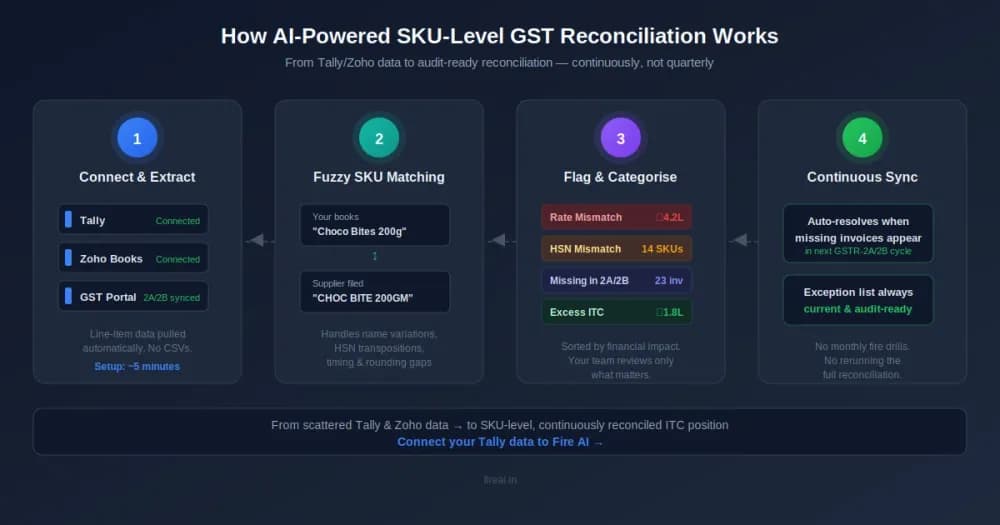
GST Credit Reconciliation by SKU: An AI-Powered Approach for FMCG
Your invoice totals match. Your GSTR-2A looks clean. But buried three levels down, at the SKU level, there's ₹14 lakh in ITC you either shouldn't have claimed — or haven't claimed at all. Here's how AI surfaces what spreadsheets can't.