

Quick answer
To build a marketing dashboard: (1) define the 5–8 marketing metrics most important to your goals (leads, CAC, conversion rate, ROAS), (2) connect your data sources (Google Analytics, Meta Ads, CRM), (3) design a unified view with funnel visibility, channel breakdown, and campaign comparisons, and (4) configure automated delivery to marketing and leadership teams.
A marketing dashboard stops the "which channel is working?" debate and replaces it with a clear, data-backed answer. Here's how to build one that gives your marketing team and leadership a real-time view of marketing performance and ROI.
Step 1: Define Your Marketing Dashboard Goals
Before building, answer: "What decisions should this dashboard enable?"
For a marketing director: Budget allocation across channels, campaign performance ranking, CAC trend by channel
For a CEO: Marketing-attributed revenue, total lead volume vs target, CAC vs LTV
For a campaign manager: Campaign-level spend, leads, CPL, and conversion rate
Design your dashboard around the decisions it needs to support, not around all available data.
Step 2: Select Your Top 5–8 Marketing Metrics
Choose metrics that directly connect marketing activity to business outcomes:
Acquisition metrics (top of funnel)
- Total leads generated (all channels combined)
- Leads by source/channel breakdown
- Cost per lead (CPL) by channel
- Organic traffic growth rate
Conversion metrics (mid funnel)
- Lead to MQL conversion rate
- MQL to SQL conversion rate
- Demo/trial to paid conversion rate
Revenue metrics (bottom of funnel)
- Marketing-sourced revenue
- Customer Acquisition Cost (CAC) by channel
- LTV:CAC ratio
- Marketing-influenced pipeline value
Campaign metrics (operational)
- Campaign-specific: spend, impressions, clicks, conversions
- ROAS (Return on Ad Spend)
- Email open and click rates
Step 3: Connect Your Data Sources
Map which tools contain each metric:
| Metric Category | Data Source |
|---|---|
| Organic traffic | Google Search Console, Google Analytics |
| Paid search | Google Ads Manager |
| Social media | Meta Business Manager, LinkedIn Ads |
| Website behaviour | Google Analytics 4 |
| Leads + pipeline | CRM (Salesforce, Zoho CRM, HubSpot) |
| Email campaigns | Mailchimp, Zoho Campaigns, SendGrid |
| Revenue | CRM or ERP (Tally for Indian businesses) |
Connect all sources to your BI platform. Most modern BI tools offer pre-built connectors for Google Analytics, Meta Ads, and common CRMs.
For Indian B2B businesses: Your CRM captures leads and pipeline; Tally captures closed revenue. The full funnel picture requires connecting both.
Step 4: Design the Dashboard Layout
Structure the dashboard to tell the marketing story top to bottom:
Row 1 — Executive Summary (KPI cards)
- Total leads this month vs target
- Marketing-attributed revenue vs target
- Blended CAC vs benchmark
- LTV:CAC ratio
Row 2 — Channel Performance (bar chart)
- Leads and CPL by channel: organic, paid search, social, email, referral
Row 3 — Funnel Visualisation (funnel chart)
- Visits → Leads → MQLs → SQLs → Customers with conversion rates at each stage
Row 4 — Campaign Breakdown (table)
- Top campaigns by leads generated and ROAS
Row 5 — Trends (line charts)
- Monthly lead volume trend, CAC trend, revenue trend
Step 5: Add Period Comparison
Every marketing metric needs context:
- This month vs last month
- This month vs same month last year
- Actual vs budget
Without comparison context, a metric like "523 leads" is meaningless. "523 leads (↑ 18% vs last month, 104% of target)" is actionable.
Step 6: Set Up Automated Delivery
Marketing performance should be reviewed weekly, not when someone remembers to open the dashboard:
- Configure weekly email delivery to marketing team and CMO
- Set daily alerts for critical metrics (CPL spike, conversion rate drop)
- Share live dashboard link with leadership for on-demand access
India-Specific Marketing Dashboard Considerations
For Indian B2B marketing:
- WhatsApp campaign metrics — WhatsApp marketing is significant in India; track message delivery, reply rate, and conversion
- Event and trade show ROI — prominent in Indian B2B; track leads and pipeline from event participation
- Referral and partner channel — often a major India B2B channel; track separately from digital channels
- Regional campaign performance — North/South/East/West comparison for pan-India campaigns
See what is a marketing analytics dashboard for the complete guide to what to include.
Ready to act on your data?
See how teams use FireAI to ask in plain language and get analytics they can trust.
Explore FireAI workflows
Go from this topic into product features and solution paths that match what you read here.
Topic hub
Dashboard And Reporting
Practical content on KPI dashboards, executive reporting, trend analysis, charts, and reporting automation.
Explore hubFrequently asked questions
What is the most important metric on a marketing dashboard?
Customer Acquisition Cost (CAC) by channel is the most actionable metric — it directly shows where marketing spend is most efficient. Combined with LTV:CAC ratio, it tells you whether growth is sustainable. Lead volume and conversion rates are also critical for diagnosing funnel performance.
How do I connect Google Analytics to a marketing dashboard?
Most BI platforms offer a direct Google Analytics connector. In FireAI, Zoho Analytics, and Power BI, you authorise the Google Analytics connection and select the views/properties you want to include. Data flows automatically from that point, updating your dashboard in real time.
How do I attribute revenue to marketing channels in a dashboard?
To attribute revenue to marketing channels, you need: (1) UTM parameters on all marketing links to track campaign source, (2) a CRM that captures the lead source, (3) closed-won opportunity values in the CRM linked to lead source. Your marketing dashboard then aggregates revenue by the source field from the CRM.
Related in this topic
What is a Marketing Analytics Dashboard?
A marketing analytics dashboard consolidates campaign performance, channel attribution, lead generation, and CAC metrics in one view. Learn what to include in a marketing dashboard and how to measure marketing ROI effectively.
How to Create a KPI Dashboard (Step-by-Step Guide)
Learn how to create a KPI dashboard from scratch — without SQL or coding. Follow this step-by-step guide to choosing the right KPIs, connecting data, designing layout, and sharing your dashboard with your team.
What is a KPI Dashboard? Definition and Examples
A KPI dashboard is a visual display of key performance indicators that gives business leaders an at-a-glance view of performance against goals. Learn what KPI dashboards include, how to build one, and see examples across sales, finance, and operations.
How to Create Your First Dashboard in 7 Steps
Build your first business dashboard from scratch — no coding needed. Follow 7 clear steps: pick your KPIs, connect data, choose charts, design the layout, and share with your team.
From the blog

CFO’s AI Analytics Guide 2026: From Monthly Close to Real Time
A working CFO AI analytics guide: replace the monthly close lag with real-time financial analytics, AI FP&A automation, and a CFO dashboard that decides.
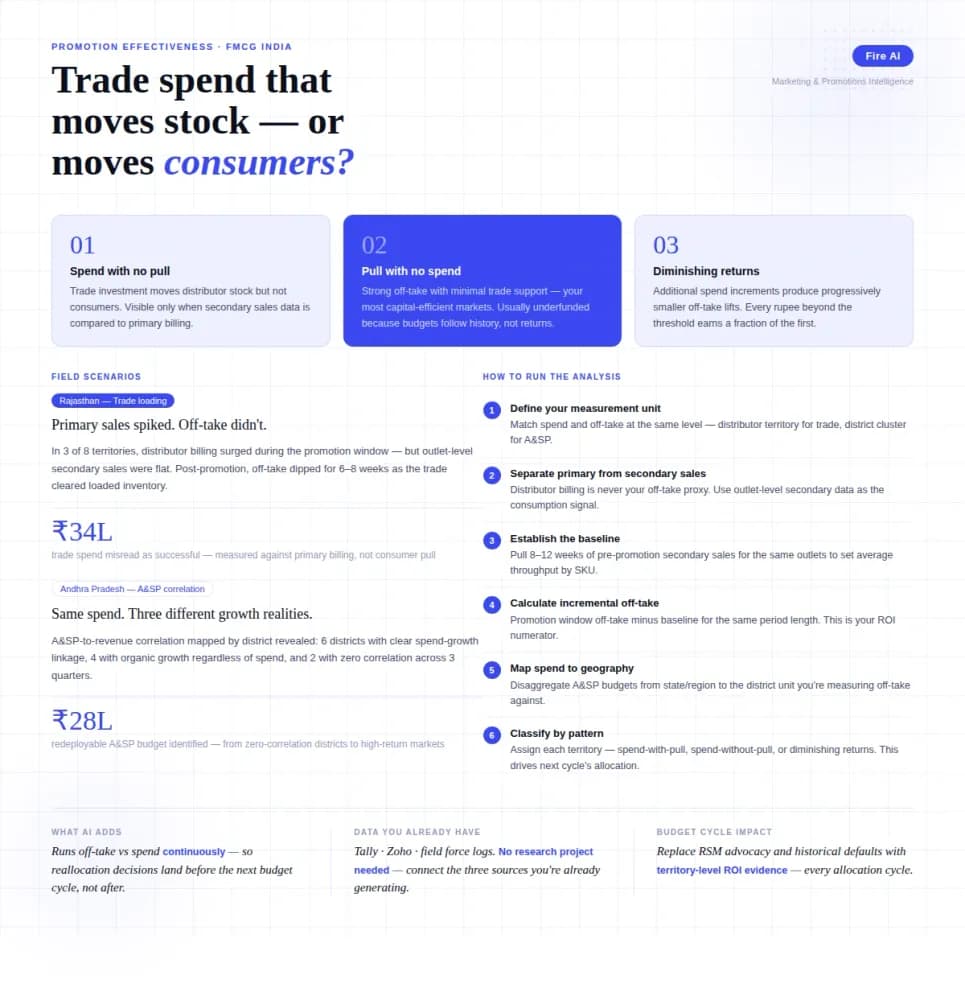
Measuring Promotion Effectiveness: A Data-Driven Guide for FMCG Marketers
FMCG brands in India spend 15–25% of gross revenue on trade promotions and A&SP (advertising and sales promotion) every year. Most can tell you how much they spent. Very few can tell you what it returned. The problem isn't a lack of data — it's that the data lives in disconnected places. Trade spend sits in finance. Off-take data lives with the distributor or field team. A&SP budgets are tracked in a marketing spreadsheet. No single view ties promotional investment to consumer pull at the outlet level. The result is a budget cycle where last year's spend allocation becomes next year's default, because no one has the numbers to argue for something different. This guide walks through how FMCG marketing and trade teams can build a promotion effectiveness framework that actually connects spend to outcome — not just channel-level assumptions.

How AI-Powered Analytics Can Transform India’s Arbitration Bottleneck?
AI-powered analytics can transform India's arbitration system by automating case classification, predicting timelines, and optimizing arbitrator allocation to cut delays.