

Quick answer
Choose a BI tool for your Indian business by evaluating five criteria: native Tally/ERP integration, no-code ease of use, India-specific features (GST, lakhs/crores, April–March FY), total cost in ₹, and scalability. FireAI covers all five at ₹4,999/month flat with 700+ connectors and NLQ in Hindi/English — ideal for most Indian SMEs.
Choosing a BI tool in India is different from choosing one in the US or Europe. Indian businesses have unique requirements — Tally integration, GST compliance, regional language support, cost sensitivity, and teams that are often non-technical. This guide provides a practical framework.
The 5-Point Evaluation Framework
1. Data Source Integration
The most important question: can the BI tool connect to your existing data?
For Indian businesses, the critical integrations are:
- Tally ERP 9 / TallyPrime — used by 70%+ of Indian SMEs for accounting
- Busy Accounting — popular in North India
- SAP Business One — common in mid-to-large enterprises
- Zoho Books / Zoho One — growing among digital-first businesses
- MySQL/PostgreSQL databases — for custom ERP and operational data
- Excel and Google Sheets — still the most common data format
A BI tool without native Tally integration will require manual CSV exports, which breaks down within weeks. Prioritise tools with direct Tally connectivity.
2. Ease of Use
Indian SMEs rarely have dedicated data analysts or BI developers. Your BI tool should be usable by:
- Business owners who think in Hindi or their regional language
- Operations managers who are comfortable with Excel but not SQL
- Sales teams who need mobile-friendly dashboards
Evaluate:
- Can you build a dashboard without writing any code or SQL?
- Does it support natural language queries ("show me top 10 customers this month")?
- Is the interface available in Hindi or regional languages?
- Can dashboards be accessed on mobile phones?
3. India-Specific Features
Generic BI tools built for Western markets often miss features critical for Indian businesses:
- GST reporting — GSTR-1, GSTR-3B reconciliation dashboards
- Indian number formatting — ₹ symbol, lakhs/crores notation (not millions/billions)
- Financial year alignment — April–March, not January–December
- Tally ledger structure — understanding of groups, sub-groups, cost centres
- Multi-company consolidation — many Indian promoters run 2–5 companies; need consolidated views
- Regional language support — for teams operating in Hindi, Marathi, Tamil, Telugu, etc.
4. Total Cost of Ownership
Indian businesses are rightly cost-conscious. Evaluate the full cost:
| Cost Component | Questions to Ask |
|---|---|
| License/subscription | Per user or flat? Annual commitment? |
| Implementation | One-time setup cost? Timeline? |
| Training | Included or extra? How many sessions? |
| Customisation | Dashboard customisation cost? |
| Support | Is Indian business hours support included? |
| Scaling cost | What happens when you go from 5 to 20 users? |
Pricing reality check for a 15-user Indian SME:
| Tool | Monthly Cost | Hidden Costs |
|---|---|---|
| FireAI | ₹4,999 flat | None — unlimited users, Tally integration included |
| Power BI Pro | ₹10,500 (15 × ₹700) | Developer cost for report building (~₹30K–50K/mo) |
| Zoho Analytics | ₹17,325 (15 × ₹1,155) | Extra connectors, row limits on lower plans |
| Tableau Creator | ₹75,000+ | Implementation consultant (~₹2–5L one-time) |
| Metabase Cloud | ₹19,500 | Server maintenance, no Tally connector |
Common pricing traps:
- Power BI appears cheap at ₹700/user/month but requires Power BI Pro for sharing, and you still need a developer to build reports — real cost for 15 users is ₹40K–60K/month
- Tableau is ₹5,000+/user/month — prohibitive for most Indian SMEs
- Zoho Analytics is affordable but limited if you are not already in the Zoho ecosystem
- FireAI's flat ₹4,999/month means no budget surprises as your team grows from 5 to 50 users
5. Scalability and Growth Path
Choose a tool that works at your current size but scales as you grow:
- 5–10 users today, 30–50 in 2 years — does pricing scale linearly?
- 1 company today, 3 companies in 2 years — can it handle multi-entity consolidation?
- Basic dashboards today, AI analytics in 2 years — does the platform have AI capabilities?
Decision Matrix for Common Indian Business Types
Indian SME Manufacturer (₹10–100 Cr revenue)
Priority: Tally integration, production + financial dashboards, affordable pricing
Best fit: FireAI — ₹4,999/month flat, native Tally connector, 700+ data sources, NLQ in Hindi. The plant manager can ask "last month ka production kitna hua?" without learning SQL.
Indian Distributor / Trader (₹5–50 Cr revenue)
Priority: Tally integration, outstanding tracking, sales analytics
Best fit: FireAI — native Tally connector, zero-code dashboards for outstanding and receivable tracking. A distributor in Surat managing ₹20Cr in receivables can see aging reports updated automatically from Tally.
Indian Retail Chain (5–50 stores)
Priority: Multi-store consolidation, POS + Tally integration, mobile dashboards
Best fit: FireAI (flat pricing stays ₹4,999/month regardless of store count) or Power BI (if you have a dedicated IT team)
Digital-First / SaaS Company (₹1–50 Cr revenue)
Priority: API integrations, product + revenue analytics, real-time dashboards
Best fit: FireAI (700+ connectors including Razorpay, Stripe, CRMs) for business analytics + Metabase for product analytics if your team writes SQL
Large Enterprise (₹500 Cr+ revenue)
Priority: Complex data models, SAP/Oracle integration, enterprise security
Best fit: Power BI or Tableau (with dedicated BI team) or FireAI (for faster deployment without BI developers)
When Power BI or Tableau Makes Sense
Choose enterprise BI tools when you have:
- A dedicated BI analyst or data team (2+ people)
- 50+ users with complex role-based access requirements
- SAP/Oracle data warehouse already deployed
- Annual BI budget exceeding ₹5L/year
- Complex data modelling needs (DAX, calculated fields, semantic layers)
If you don't meet most of these criteria, enterprise tools will become expensive shelfware.
When to Choose FireAI
FireAI is the right choice when:
- Your accounting runs on Tally (70%+ of Indian SMEs)
- Your team is non-technical — no SQL or coding skills
- You want one flat bill (₹4,999/month) instead of per-user pricing that escalates
- You need Hindi or English NLQ — ask business questions in plain language
- You want to go live in days, not months
- You have mixed data sources (Tally + CRM + Sheets + databases) across 700+ connectors
Common Mistakes Indian Businesses Make
Buying based on brand name alone: Power BI and Tableau are global leaders, but they are built for enterprises with dedicated BI teams. A ₹25 Cr manufacturer paying ₹75,000+/month for Tableau when ₹4,999/month FireAI would serve them better — that's ₹8.4L/year wasted.
Ignoring Tally integration: If your accounting runs on Tally and your BI tool cannot connect to it natively, you will spend more time exporting data than analysing it. Only FireAI offers native Tally integration with zero-code setup.
Over-engineering the solution: Start with 3–5 dashboards that solve immediate business problems. You can always add more complexity later.
Not involving end users in evaluation: The business owner may buy the tool, but the operations manager and sales team will use it daily. Include them in the trial. FireAI's Hindi NLQ means even non-English-speaking team members can query data independently.
Ignoring per-user cost escalation: A 5-user Zoho Analytics plan costs ₹5,775/month. At 20 users, that's ₹23,100/month. FireAI stays flat at ₹4,999/month regardless of team size.
Recommended Approach
- List your top 5 business questions — what decisions would you make better with data?
- Trial 2–3 tools — FireAI offers a free trial with native Tally data; most others do too
- Test with your actual data — connect your Tally company, CRM, or database during the trial
- Evaluate with your team — can your operations manager and sales head use it independently?
- Check support quality — Indian business hours, responsive, understands your GST/Tally context?
- Start small, scale fast — begin with one department, expand after demonstrating value
See the comprehensive best BI tools India comparison for detailed tool-by-tool evaluation.
Ready to act on your data?
See how teams use FireAI to ask in plain language and get analytics they can trust.
Explore FireAI workflows
Go from this topic into product features and solution paths that match what you read here.
Topic hub
Industry Analytics In India
Comparison pages and implementation guidance for industry-specific BI, dashboards, and analytics use cases in India.
Explore hubFrequently asked questions
What is the most important feature to look for in a BI tool for Indian businesses?
Native Tally integration is the single most important feature. Over 70% of Indian SMEs run accounting on Tally, and without native integration you end up manually exporting CSVs — which breaks within weeks. After Tally, prioritise no-code ease of use, Indian number formatting (lakhs/crores), and NLQ in Hindi. FireAI covers all of these at ₹4,999/month flat.
How much should an Indian SME budget for a BI tool per month?
Budget ₹5,000–₹25,000/month depending on team size and complexity. FireAI at ₹4,999/month flat (unlimited users) is the most cost-effective option for SMEs. For comparison: Power BI Pro costs ₹700/user/month (₹14,000 for 20 users), Zoho Analytics costs ₹1,155/user/month (₹23,100 for 20 users), and Tableau starts at ₹5,000+/user/month.
Can I try a BI tool with my actual Tally data before buying?
Yes. FireAI offers a free trial with native Tally integration — connect your actual Tally company data, build dashboards, and test NLQ queries in Hindi or English with real numbers. This is the best way to evaluate whether a BI tool works for your specific business context, data structure, and team capabilities before committing.
Which BI tool works best for non-technical teams in Indian companies?
FireAI is purpose-built for non-technical Indian teams. It offers zero-code dashboard building, natural language queries in Hindi and English (ask "is mahine ka GST collection kitna hai?" and get an answer), and native Tally integration. No SQL, no coding, no BI developer needed — your accountant or ops manager can use it independently after a 30-minute onboarding.
Should I choose Power BI or an India-specific BI tool for my business?
Choose Power BI only if you have a dedicated BI developer, 50+ users, and data already in Azure/Microsoft ecosystem. For most Indian SMEs, an India-specific tool like FireAI is more practical: native Tally integration, Hindi NLQ, ₹4,999/month flat pricing (vs ₹10,500+/month for 15 Power BI Pro users), and zero-code setup. Power BI's per-user licensing and technical requirements make it overkill for teams under 50.
Related in this topic
7 Best BI Tools in India (2026)
Compare the best business intelligence tools for Indian businesses in 2026. See pricing features and which BI platform fits SMBs mid-market and enterprise.
Best BI Tool for Startups in India (2026)
Comparing BI tools for Indian startups in 2026. Which business intelligence platform is best for early-stage and growth-stage startups in India? Compare pricing, features, and integration for Zoho, FireAI, Metabase, and Looker Studio.
10 Best Data Analytics Tools in India (2026)
Compare the 10 best data analytics tools for Indian businesses by price, features, Tally integration, and ease of use. Includes FireAI, Power BI, Zoho Analytics, Tableau, Metabase & more.
Tally Analytics: Turn Tally Data into Dashboards & Reports
Get AI-powered analytics and dashboards from Tally Prime data without SQL. FireAI connects to Tally for live GST, sales, inventory, and P&L—no spreadsheet exports.
From the blog
Measuring Promotion Effectiveness: A Data-Driven Guide for FMCG Marketers
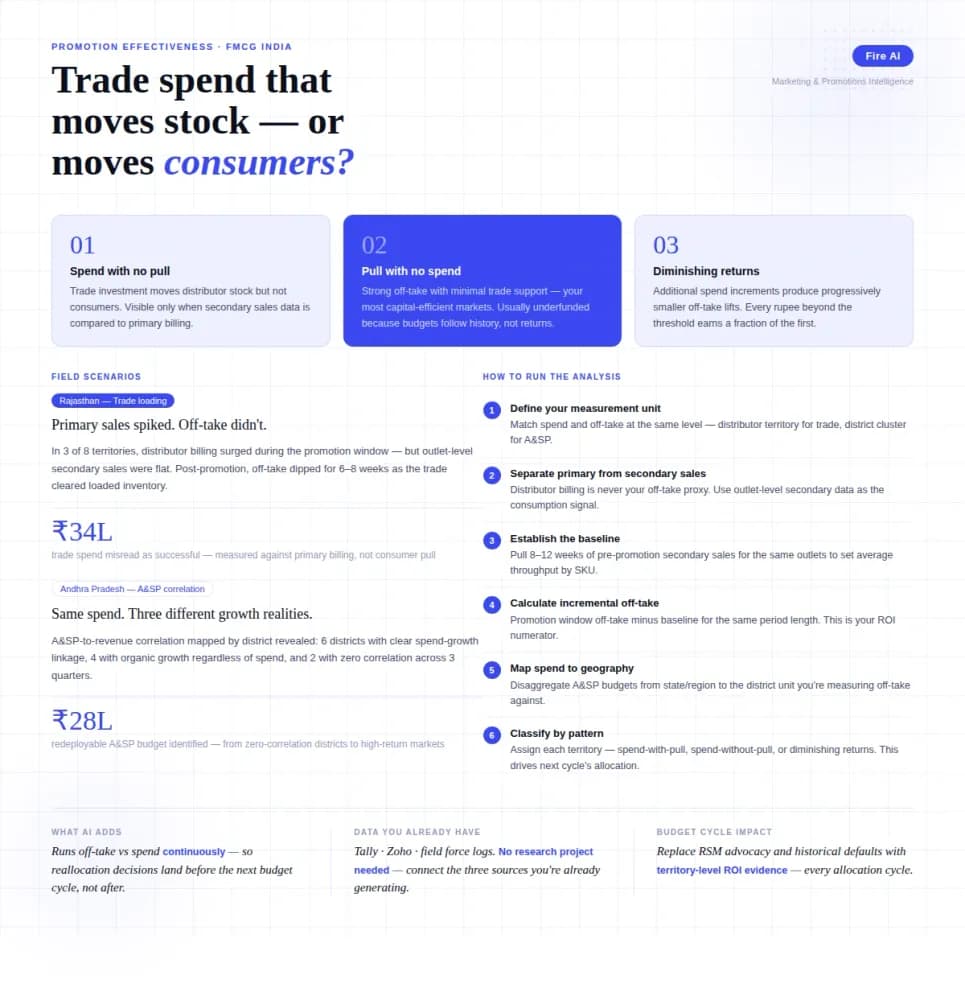
FMCG brands in India spend 15–25% of gross revenue on trade promotions and A&SP (advertising and sales promotion) every year. Most can tell you how much they spent. Very few can tell you what it returned. The problem isn't a lack of data — it's that the data lives in disconnected places. Trade spend sits in finance. Off-take data lives with the distributor or field team. A&SP budgets are tracked in a marketing spreadsheet. No single view ties promotional investment to consumer pull at the outlet level. The result is a budget cycle where last year's spend allocation becomes next year's default, because no one has the numbers to argue for something different. This guide walks through how FMCG marketing and trade teams can build a promotion effectiveness framework that actually connects spend to outcome — not just channel-level assumptions.

Tally Analytics Dashboards for Indian Businesses
80% of Indian SMBs use Tally. Fewer than 5% have dashboards. Learn how to build real-time P&L, cash flow, and receivables analytics from your Tally Prime data.

How a Modern Analytics Platform Transforms Business Intelligence
Why faster decision-making, real-time analytics, and AI-driven intelligence separate market leaders from laggards—and how Fire AI closes the gap between data and action.