

Quick answer
Yes, AI can automatically generate business reports. Modern AI-powered BI platforms connect to your data sources, extract key metrics and trends, identify anomalies, and compose formatted reports with written summaries and visualisations — delivered to stakeholders on a defined schedule without any manual preparation.
Yes — AI can generate business reports automatically, and for most routine reporting tasks, it is ready to replace manual report preparation today.
The traditional business report process looks like this: pull data from Tally, paste into Excel, format the table, write commentary, create charts, compile into a deck, email to the management team. This cycle repeats every week, every month, every quarter.
AI-powered reporting automates every step of this process.
What AI-Generated Business Reports Look Like
AI report generation produces documents that include:
- Executive summary — a written paragraph summarising the most important developments in plain language
- Key metrics — revenue, margins, costs, and other KPIs with targets and period comparisons
- Trend visualisations — auto-generated charts showing performance over time
- Notable changes — specific items where performance deviated significantly from expectations
- Recommendations — suggested actions based on the data patterns identified
An example AI-generated report summary might read:
"Revenue for March 2026 was ₹87.4 lakh, representing 94% of target and a 12.3% increase over March 2025. The North region drove 40% of revenue growth. Gross margin improved 1.2 percentage points due to lower raw material costs. Outstanding receivables increased to ₹23.2 lakh — the highest in 6 months, with 3 accounts overdue beyond 60 days. Recommended action: prioritise collection follow-up on [Account A], [Account B], and [Account C] this week."
No human wrote this — AI composed it from live business data.
How AI Report Generation Works
1. Data Connection
The AI connects to all relevant data sources — Tally for financial data, CRM for sales, databases, or spreadsheets. See can AI work with Tally data for specifics on Tally integration.
2. Metric Calculation and Comparison
For each metric in the report template, the AI:
- Queries the current period's value
- Compares to target, prior period, and prior year
- Calculates variance and percent change
3. Insight Extraction
Using statistical analysis and pattern recognition:
- Identifies the top drivers of change (which products, customers, or regions)
- Flags anomalies (anything deviating significantly from expected)
- Surfaces the most noteworthy positive and negative developments
4. Narrative Generation
This is where generative BI plays a critical role — large language models compose the written commentary that translates numbers into plain language business narratives.
5. Formatting and Delivery
The report is formatted to a defined template and delivered:
- PDF or Word document for formal reports
- Email with inline charts for operational summaries
- Live dashboard link for interactive exploration
Types of Business Reports AI Can Generate
| Report Type | Frequency | Content |
|---|---|---|
| Daily sales summary | Daily | Revenue, orders, top SKUs |
| Weekly operations review | Weekly | All KPIs vs targets, notable changes |
| Monthly P&L summary | Monthly | Full P&L, margin analysis, cost commentary |
| Collections report | Weekly | Overdue receivables, collection activity |
| Inventory status report | Daily/Weekly | Stock levels, near-expiry, reorder alerts |
| Board-level report pack | Quarterly | Full business review with narrative |
Benefits of AI-Generated Reports
Time savings: Eliminating 2–8 hours of monthly manual report preparation is the most immediate benefit. Across 12 months, this frees up 24–96 hours per report per year.
Consistency: AI-generated reports use the same format, definitions, and calculation logic every time. Manual reports introduce inconsistencies when different people prepare them or when formulas are accidentally modified.
Timeliness: AI generates the report the moment the data is available — not 3 days after month-end while a finance analyst has time to prepare it.
Completeness: AI reviews 100% of data for the report. Humans review what they have time to review and what they know to look for.
How to Start Using AI Report Generation
- Choose a BI platform with report automation capability and native integration to your data sources (Tally, CRM, etc.)
- Define your report template — which metrics, which comparisons, which threshold alerts
- Connect your data and validate that metrics match your manual calculation
- Run the first AI report alongside your manual report — compare and reconcile differences
- Configure scheduled delivery — daily, weekly, or monthly to defined recipients
- Retire the manual process once you trust the automated output
See how to automate monthly reports for a detailed implementation guide.
Ready to act on your data?
See how teams use FireAI to ask in plain language and get analytics they can trust.
Explore FireAI workflows
Go from this topic into product features and solution paths that match what you read here.
Topic hub
Dashboard And Reporting
Practical content on KPI dashboards, executive reporting, trend analysis, charts, and reporting automation.
Explore hubFrequently asked questions
Can AI really write business report commentary?
Yes. Modern large language models can compose business narrative commentary from structured data — describing what changed, why it matters, and what to do about it. The quality depends on the underlying data structure and the LLM used, but for standard business reporting summaries, AI-generated commentary is comparable to human writing.
How accurate are AI-generated business reports?
AI-generated reports are as accurate as the underlying data and the metric definitions configured in the system. Once validated against your manual process, AI reports typically have equal or higher accuracy because they eliminate manual copy-paste errors and apply consistent calculation logic every time.
What is the best AI tool for generating business reports in India?
For businesses using Tally, FireAI is the best option — it connects natively to Tally, generates automated reports with AI commentary, and delivers them via email on a schedule. It supports Hindi and regional languages and requires no technical team to set up.
Can AI generate reports from Tally data?
Yes. AI tools like FireAI connect directly to Tally Prime and ERP 9, extract financial and operational data, and generate formatted business reports automatically. This includes P&L summaries, sales reports, inventory status, and receivables ageing — all without any manual data export.
Related in this topic
How to Automate Monthly Business Reports
Learn how to automate monthly reports for sales, finance, and operations. Stop spending hours on manual Excel reports — set up automated dashboards and scheduled report delivery with AI-powered BI tools.
What is Generative BI? AI-Powered BI Explained
Generative BI uses large language models (LLMs) to automatically generate reports, insights, visualizations, and natural language summaries from business data. Learn what generative BI is, how it works, and how it differs from traditional BI tools.
Can AI Automate Business Reporting?
Learn how AI automates business reporting through intelligent data processing, automated report generation, and smart dashboard creation. Discover AI capabilities in report automation, scheduling, and distribution for efficient business intelligence.
What is Automated Analytics? Definition and Benefits
Automated analytics uses AI and machine learning to automatically generate insights, detect anomalies, and deliver reports without manual intervention. Learn how automated analytics works and how it reduces the reporting burden on business teams.
From the blog
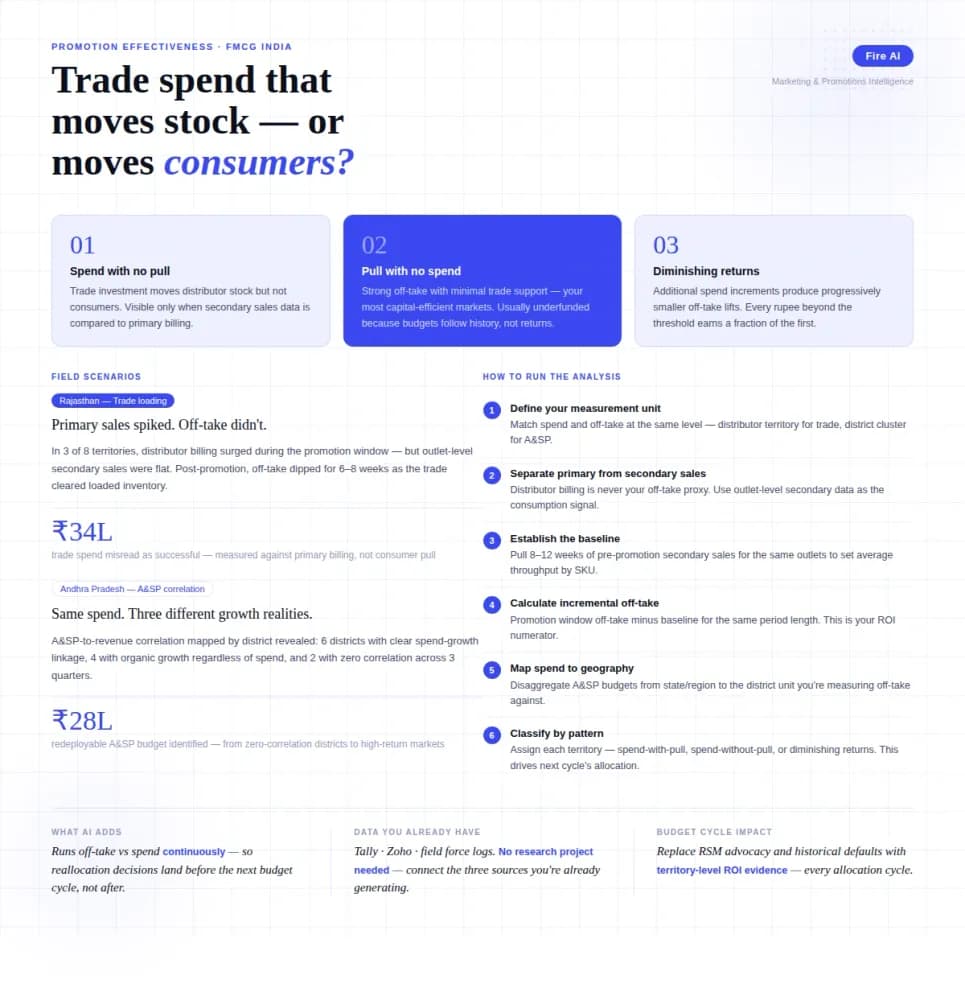
Measuring Promotion Effectiveness: A Data-Driven Guide for FMCG Marketers
FMCG brands in India spend 15–25% of gross revenue on trade promotions and A&SP (advertising and sales promotion) every year. Most can tell you how much they spent. Very few can tell you what it returned. The problem isn't a lack of data — it's that the data lives in disconnected places. Trade spend sits in finance. Off-take data lives with the distributor or field team. A&SP budgets are tracked in a marketing spreadsheet. No single view ties promotional investment to consumer pull at the outlet level. The result is a budget cycle where last year's spend allocation becomes next year's default, because no one has the numbers to argue for something different. This guide walks through how FMCG marketing and trade teams can build a promotion effectiveness framework that actually connects spend to outcome — not just channel-level assumptions.

How AI-Powered Analytics Can Transform India’s Arbitration Bottleneck?
AI-powered analytics can transform India's arbitration system by automating case classification, predicting timelines, and optimizing arbitrator allocation to cut delays.

What is a KPI dashboard and why does every Indian business need one?
Still piecing together your business numbers from WhatsApp messages and old Excel files? Here is why a KPI dashboard changes everything for Indian businesses.