

Quick answer
Automate Tally reports by connecting Tally Prime to FireAI's one-click connector. It syncs data in real time with zero-code setup, applies pre-built dashboard templates, and schedules P&L, cash flow, sales, and GST reports for daily or weekly email delivery — replacing the manual export-format-email cycle entirely.
Automate Tally reports by connecting Tally Prime to FireAI — a one-click, zero-code connector that syncs your data in real time and schedules report delivery automatically. This eliminates the most time-consuming part of financial reporting for Indian businesses — the manual export, cleanup, and formatting cycle that happens every week or month.
Most Tally users follow the same painful routine: export data to Excel, clean up formatting, build pivot tables, copy into a presentation, and email it to management. For a ₹5–50 Cr turnover business, the finance team typically spends 15–20 hours per month just on this cycle. FireAI's real-time auto-sync and pre-built dashboard templates replace this entire workflow with automated, always-current reports. See how to connect Tally to BI and Tally analytics to get started.
What Can Be Automated
Financial Reports
- Profit & Loss statement — built from Tally ledger data with period comparison
- Balance Sheet — current position with year-over-year changes
- Cash Flow statement — operating, investing, and financing activities derived from vouchers
- Budget vs Actual — variance analysis if budgets are defined
Operational Reports
- Sales summary — by customer, product, region, and sales rep
- Purchase summary — by vendor, material, and category
- Inventory status — stock levels, slow-moving items, reorder alerts
- Outstanding receivables — ageing buckets with customer drill-down
- Outstanding payables — vendor payment schedules and due dates
Compliance Reports
- GSTR-1 summary — outward supply breakdown ready for filing review
- GSTR-3B liability — net GST payable after ITC adjustment
- TDS report — deductions made and pending deposit
- HSN-wise summary — for annual return preparation
The Manual Reporting Problem
Here's what typical Tally reporting looks like without automation:
| Step | Time Spent | Pain Point |
|---|---|---|
| Export from Tally to Excel | 15–30 min | Format breaks, columns misaligned |
| Clean and reformat data | 30–60 min | Every export needs manual cleanup |
| Build pivot tables and charts | 30–60 min | Repeated every cycle |
| Copy to presentation | 15–30 min | Formatting inconsistencies |
| Email to stakeholders | 10 min | No version control, stale by arrival |
| Answer follow-up questions | 30+ min | Requires running new Tally reports |
Total: 3–5 hours per reporting cycle. For a business that does weekly MIS, that's 12–20 hours per month spent on reporting alone.
How AI Automation Works with Tally
Step 1: Connect Tally with FireAI's One-Click Connector
Install FireAI's Tally connector — it takes under 5 minutes with zero-code setup (see how to connect Tally to BI). The connector auto-syncs sales, purchase, inventory, ledger, and GST data from Tally Prime in real time. No ODBC configuration, no TDL scripts, no IT team needed.
Step 2: Use Pre-Built Dashboard Templates
FireAI provides pre-built dashboard templates for common financial use cases, so you're up and running the same day:
- P&L dashboard with gross margin, operating margin, and net profit trends
- Cash flow dashboard with receivables vs payables position
- Sales dashboard with customer concentration and product mix
- Inventory dashboard with stock levels and turnover ratios
For a ₹10 Cr distributor, this means seeing your daily sales split by product line and region within hours of connecting — not weeks of Excel work.
Step 3: Schedule Report Delivery
Configure automated reports:
Daily reports:
- Cash position summary
- Outstanding receivables due today
- Sales booked yesterday
Weekly reports:
- Week-over-week sales comparison
- Inventory alerts (low stock, slow-moving items)
- Receivables ageing movement
Monthly reports:
- Full P&L with variance against budget and previous year
- Balance sheet summary
- Cash flow statement
- GST summary for filing preparation
- Top customer and vendor analysis
Reports can be delivered via email or viewed directly on the mobile-responsive FireAI dashboard.
Step 4: Use Natural Language Queries (NLQ) for Ad-hoc Reports
When management asks questions that aren't in the scheduled reports, FireAI's NLQ engine lets anyone get answers instantly — just type a question in plain English or Hindi:
- "What were our top 20 customers by revenue this quarter?"
- "Show me expenses by category compared to last year"
- "Which stock items have less than 7 days of inventory left?"
- "What is our DSO trend over the last 6 months?"
- "पिछले महीने की बिक्री दिखाओ"
No need to go back to Tally, export data, and build a new report. The answer comes in seconds — even from your mobile phone.
Automation vs Manual: The Impact
| Metric | Manual Reporting | AI-Automated Reporting |
|---|---|---|
| Time per cycle | 3–5 hours | 0 (automated) |
| Data freshness | Stale (export point-in-time) | Real-time |
| Report format | Inconsistent (Excel, PPT) | Consistent dashboards |
| Ad-hoc questions | Requires new export cycle | Instant NLQ answer |
| Error rate | High (manual copy-paste) | Near-zero (automated) |
| Multi-company consolidation | Hours of manual work | Automatic |
| Mobile access | None | Full dashboard on mobile |
What AI Analytics Can Add Beyond Scheduling
Scheduling is just one benefit. AI-powered BI platforms are increasingly offering capabilities such as:
Anomaly Detection
AI can monitor transaction data and flag unusual patterns:
- Expense category that spiked unexpectedly
- Customer whose order volume dropped significantly
- Inventory item with abnormal movement
Trend analysis
AI can identify trends that you wouldn't spot in a single report:
- Gross margin has been declining 0.5% every month for 6 months
- DSO is increasing — collections are slowing
- A specific product line's contribution to revenue is shrinking
Predictive Insights
Based on historical data, AI analytics tools can forecast:
- Expected cash inflows for the next 30 days based on receivables patterns
- Inventory stockout risk for fast-moving items
- Revenue trajectory for the quarter based on current run rate
Getting Started with Automated Tally Reporting
- Sign up for FireAI — free trial available, no credit card required
- Install the one-click Tally connector — runs alongside Tally Prime on your machine, zero-code setup
- Auto-sync your company data — real-time sync starts within minutes
- Review pre-built dashboards — P&L, sales, inventory, receivables templates ready instantly
- Schedule your first reports — set frequency, recipients, and delivery channel
- Ask your first NLQ question — try "Show me last month's P&L summary"
The transition from manual Tally reporting to automated AI analytics typically saves finance teams 15–20 hours per month. For a ₹20 Cr manufacturing business with 3 branches, that's ₹1.5–2 lakh per month in recovered productivity — time better spent on analysis, vendor negotiations, and growth rather than data extraction and formatting.
Ready to act on your data?
See how teams use FireAI to ask in plain language and get analytics they can trust.
Explore FireAI workflows
Go from this topic into product features and solution paths that match what you read here.
Topic hub
Tally Analytics
Analytics for Tally Prime and Tally ERP — one of 700+ data sources FireAI connects to — including dashboards, reporting, GST, and finance workflows.
Explore hubFrequently asked questions
Can I automate MIS reports from Tally without any coding?
Yes. FireAI connects to Tally Prime with a one-click, zero-code connector and provides pre-built dashboard templates. You can schedule P&L, sales, cash flow, and other MIS reports for daily, weekly, or monthly delivery without writing any code, SQL, or Excel formulas.
Will automated reports update when I post new vouchers in Tally?
Yes. FireAI's real-time auto-sync means when you post a new sales voucher, receipt, or journal entry in Tally, the connected dashboards and scheduled reports reflect the updated data automatically — no manual refresh needed.
Can I still create custom ad-hoc reports if the scheduled ones don't answer my question?
Yes. FireAI supports natural language queries (NLQ) — type a question like "Show me top 10 customers by outstanding amount" in English or Hindi and get an instant visual answer. This replaces the need to go back to Tally and manually export data for one-off analysis.
How much time does automating Tally reports save per month?
Most Indian SMBs spend 15–20 hours per month on manual Tally reporting — exporting, cleaning, formatting, and emailing. With FireAI's automated reporting, this drops to near zero. For a ₹10–50 Cr business, that translates to ₹1–2 lakh per month in recovered team productivity.
Can I automate GST and compliance reports from Tally Prime?
Yes. FireAI auto-syncs GST data from Tally Prime and generates GSTR-1 summaries, GSTR-3B liability views, ITC reconciliation, and HSN-wise breakdowns on a scheduled basis — helping CAs and finance teams prepare for filing without manual data extraction.
Related in this topic
Tally Analytics: Turn Tally Data into Dashboards & Reports
Get AI-powered analytics and dashboards from Tally Prime data without SQL. FireAI connects to Tally for live GST, sales, inventory, and P&L—no spreadsheet exports.
Why Automate Tally Reporting Instead of Manual Exports
Manual Tally reporting wastes 15-20 hours per month on exports, formatting, and email. Learn why automated reporting saves time, improves accuracy, and enables real-time decisions.
How to Build Financial Dashboards
Learn how to build effective financial dashboards by focusing on key financial metrics, designing CFO-friendly layouts, and implementing real-time financial monitoring. Discover which metrics to track, dashboard design principles, and best practices for financial analytics.
Can AI Work with Tally Prime and ERP 9 Data?
Yes — AI can connect directly to Tally Prime and Tally ERP 9 to deliver instant dashboards, natural language queries, and automated insights on your financial, sales, and inventory data. Learn how AI analytics works with Tally data.
From the blog

Tally Analytics Dashboards for Indian Businesses
80% of Indian SMBs use Tally. Fewer than 5% have dashboards. Learn how to build real-time P&L, cash flow, and receivables analytics from your Tally Prime data.

Democratizing Data: How AI Analytics Levels the Playing Field for Small Businesses and Freelancers
For decades, data-driven decision making was a luxury that only enterprises could afford. Big companies hired data scientists, purchased expensive BI tools, and built complex data warehouses. In exchange, they received precise insights that guided budgets, strategy, and growth.
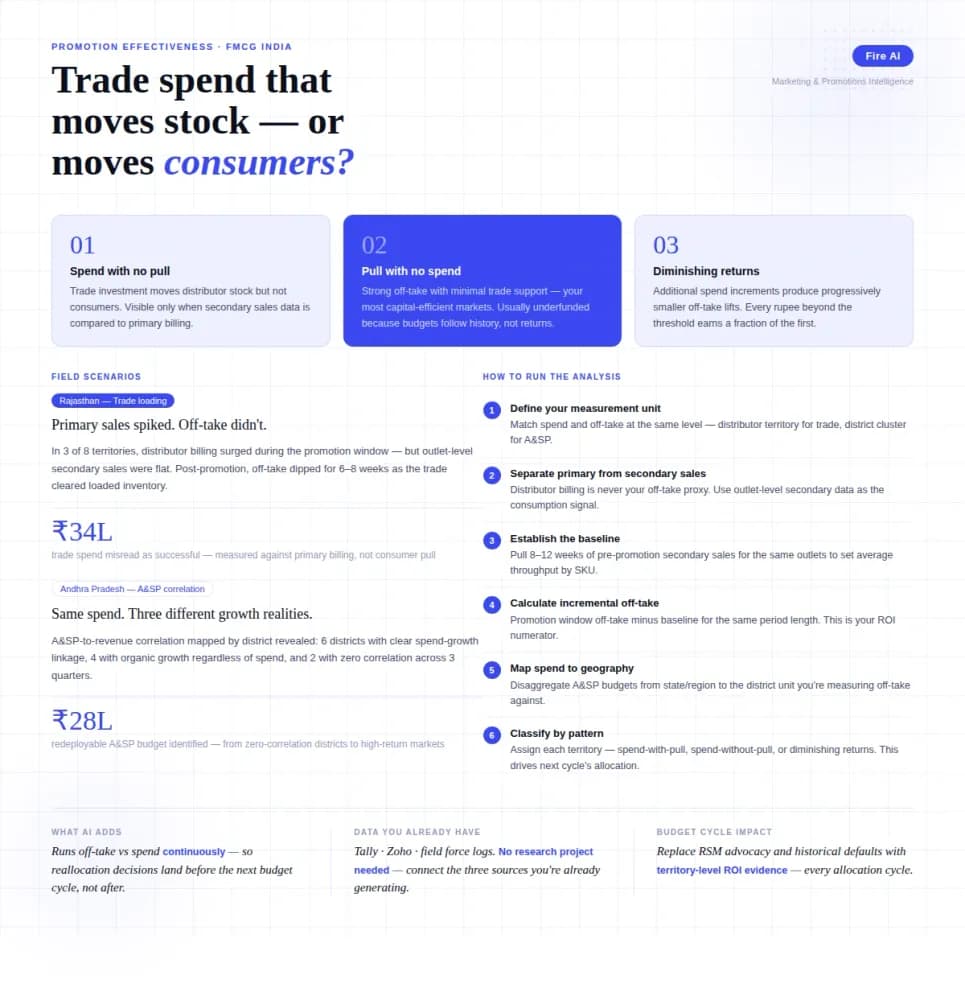
Measuring Promotion Effectiveness: A Data-Driven Guide for FMCG Marketers
FMCG brands in India spend 15–25% of gross revenue on trade promotions and A&SP (advertising and sales promotion) every year. Most can tell you how much they spent. Very few can tell you what it returned. The problem isn't a lack of data — it's that the data lives in disconnected places. Trade spend sits in finance. Off-take data lives with the distributor or field team. A&SP budgets are tracked in a marketing spreadsheet. No single view ties promotional investment to consumer pull at the outlet level. The result is a budget cycle where last year's spend allocation becomes next year's default, because no one has the numbers to argue for something different. This guide walks through how FMCG marketing and trade teams can build a promotion effectiveness framework that actually connects spend to outcome — not just channel-level assumptions.