

Quick answer
To build a logistics analytics dashboard, pick a small set of KPIs for service, asset use, and cost, then connect TMS, GPS or telematics, and finance or ERP data in one model. Layout an executive layer, a hub and lane view, and exception queues. FireAI can unify these sources and help auto-build role-based logistics dashboards and natural-language reports.
Building a logistics analytics dashboard means turning dispatch, trip, and money data into one place where you can see service levels, cost per move, and asset use at network and branch level, without a daily spreadsheet firefight.
Couriers, 3PLs, and B2B transport operators in India usually already have pieces of the picture in a TMS, GPS vendor, and Tally or ERP, but the dashboard fails when IDs, time zones, and cost allocation do not line up. The steps below are the same pattern the logistics operations use case set describes: align metrics, wire sources, then design views by role. For the strategic context, read why logistics companies need analytics first.
Step 1: Lock the logistics KPIs that match your business model
Do not start with “every report we have.” Start with 8–12 metrics that your CEO, ops head, and branch manager would argue about in the same room.
- Service: on-time delivery %, in-full %, first-attempt success, time-window compliance (as you define it for contracts)
- Asset productivity: vehicle utilization, trips per vehicle per day, idle and dwell time, deadhead or empty run %
- Cost and margin: cost per trip or per km, cost per ton or per CBM, lane or corridor P&L (tie-in to lane profitability analysis)
- Fleet health: fuel per km, maintenance cost per km, breakdown or downtime hours
Per role: network leadership needs trend and exception; a hub manager needs the same metrics filtered to branch; finance needs accrual-friendly views that match billing. If you include everything in one page, no one uses it.
Step 2: Map data sources and a single “trip or shipment” grain
Your dashboard is only as good as one stable key that links order, trip, vehicle, and invoice.
- TMS or dispatch for planned route, customer, and promised time window
- GPS / telematics for odometer, idling, geofence arrival, and route adherence
- ERP or Tally for revenue recognition, customer or lane rates, and fuel and hire costs where booked
- Fuel cards or bunk reconciliation for fuel cost if not in ERP in time
Minimum modeling rules:
- One shipment or trip ID on every fact table you roll up
- Branch, hub, or operating unit on each row
- Planned vs actual timestamps in the local timezone of the operation, then stored in UTC with offset if you run multi-state
Without this, you will build a pretty chart that fleet management analytics cannot trust for fuel or OTD, because two systems double-count the same day.
Step 3: Design the dashboard layout in three layers
Layer 1, executive (one screen): rolling 7- and 28-day OTD, cost per trip or per km, fleet utilization, and a single “red” count for SLA or margin breaches. No drill-only vanity tiles.
Layer 2, network and hub: OTD and cost by hub, by lane, and by key account, with comparison to target where you have contracts. This is where you connect operations to delivery SLA tracking and pricing.
Layer 3, exceptions and lists: top delayed lanes, vehicles with outlier fuel, trips missing POD, and receivables or freight accrual gaps if finance owns the same dashboard. Exceptions should be actionable, sorted by money or contract risk.
Drill path: from India summary → state or zone → hub → trip list. That matches how issues get fixed on the ground.
Step 4: Add refresh, ownership, and data quality checks
Define refresh expectations: near-real-time for GPS status is different from Tally-locked month-end P&L. Label each block with as of time so branches do not debate stale numbers.
Name owners: who fixes wrong branch mapping, who owns TMS–GPS link breaks, and who approves a new client SLA target in the model.
Quality gates: week-one checks for duplicate trips, null vehicle IDs, and percent of orders that never received a telematics match. A dashboard that is 20% unmapped is a trust problem, not a chart problem.
How FireAI auto-builds logistics dashboards
FireAI is built to connect operational and finance data so logistics teams are not stuck exporting TMS, then GPS, then Tally into one Excel. You can work from connected data, ask questions in plain English (for example, which hub drove the OTD drop last week, or which lane is negative margin after fuel), and get answers without waiting for a full BI project each time. Dashboards and metrics can be generated and adapted as your transport analytics needs mature, with cargo and logistics solutions as the entry point for industry-specific rollouts.
For a buyer-oriented view of platforms, best BI tools for logistics in India compares what to look for in freight analytics and integration depth alongside internal build steps.
Ready to act on your data?
See how teams use FireAI to ask in plain language and get analytics they can trust.
Explore FireAI workflows
Go from this topic into product features and solution paths that match what you read here.
Topic hub
Industry Analytics In India
Comparison pages and implementation guidance for industry-specific BI, dashboards, and analytics use cases in India.
Explore hubFrequently asked questions
What KPIs should a logistics analytics dashboard include first?
Start with a balanced set: on-time or in-window delivery, fleet utilization, cost per trip or per km, and fuel or maintenance cost per km. Add lane or customer-level margin once trip and cost allocation are reliable. The exact mix depends on whether you are asset-heavy, long-haul, or last mile.
What systems do I need to connect for a full logistics dashboard?
At minimum, connect TMS or dispatch (plan and status), telematics or GPS (actuals and odometer), and finance (rates, accruals, and fuel or hire costs). Optional feeds include fuel card data, e-POD, and client SLA targets. The critical part is a stable shipment or trip key across them.
How is a logistics analytics dashboard different from a TMS report?
A TMS report is usually built for day-to-day operations on one system. A logistics analytics dashboard combines TMS with GPS, fuel, and money data so you can see service, productivity, and margin together, and benchmark hubs and lanes. Finance and sales care about the combined view, not the TMS view alone.
Can FireAI build dashboards for Indian logistics companies without a large data team?
Yes. FireAI is designed to connect sources like Tally, ERP, and operational data, then surface role-based views and natural language answers so teams are not maintaining parallel spreadsheets for OTD, fuel, and cost.
Related in this topic
Why Logistics Companies Need Analytics in 2026
Learn why transport and logistics operators need analytics: margin pressure, fleet underutilization, delivery SLA risk, and fuel waste. See how dashboards and AI-driven insights from trip, fuel, and ERP data improve profitability.
What is Fleet Management Analytics? Key Metrics Explained
Fleet management analytics tracks vehicle utilization, fuel efficiency, idle time, driver performance, and maintenance costs in one dashboard. Learn the key metrics, India-specific benchmarks, and how FireAI builds live fleet dashboards from GPS, TMS, and Tally data.
Best BI Tools for Logistics Companies in India (2026)
Compare the best BI and analytics platforms for Indian logistics and transport companies. See how tools stack up on fleet management, lane profitability, delivery SLA tracking, and Tally-friendly finance dashboards.
What Is Lane Profitability Analysis in Logistics?
Lane profitability analysis breaks down revenue and costs by origin-destination route so transport and 3PL teams know which lanes earn margin. Learn how to allocate freight revenue, direct costs, and overheads, benchmark lanes, and build lane P&L in FireAI from TMS and Tally data.
From the blog

Democratizing Data: How AI Analytics Levels the Playing Field for Small Businesses and Freelancers
For decades, data-driven decision making was a luxury that only enterprises could afford. Big companies hired data scientists, purchased expensive BI tools, and built complex data warehouses. In exchange, they received precise insights that guided budgets, strategy, and growth.
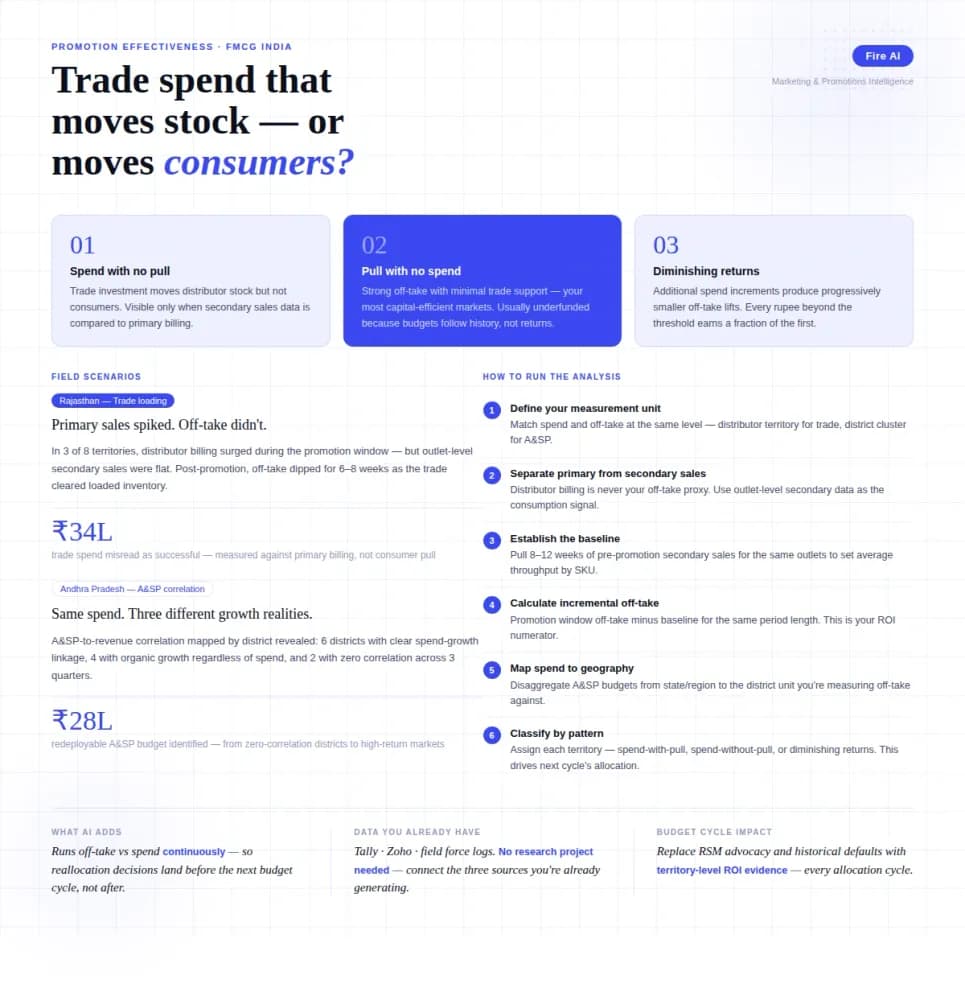
Measuring Promotion Effectiveness: A Data-Driven Guide for FMCG Marketers
FMCG brands in India spend 15–25% of gross revenue on trade promotions and A&SP (advertising and sales promotion) every year. Most can tell you how much they spent. Very few can tell you what it returned. The problem isn't a lack of data — it's that the data lives in disconnected places. Trade spend sits in finance. Off-take data lives with the distributor or field team. A&SP budgets are tracked in a marketing spreadsheet. No single view ties promotional investment to consumer pull at the outlet level. The result is a budget cycle where last year's spend allocation becomes next year's default, because no one has the numbers to argue for something different. This guide walks through how FMCG marketing and trade teams can build a promotion effectiveness framework that actually connects spend to outcome — not just channel-level assumptions.

How a Modern Analytics Platform Transforms Business Intelligence
Why faster decision-making, real-time analytics, and AI-driven intelligence separate market leaders from laggards—and how Fire AI closes the gap between data and action.