
Step 14 · Use and automate
Get reports and warnings automatically
Schedule a FireAI dashboard to arrive on WhatsApp or email every day, and create an alert in Alerts & Schedules that warns you when a KPI such as daily sales drops below a threshold.
Updated September 30, 2026
FireAI can send a dashboard to people every day, and warn you when a number crosses a line, on WhatsApp or email.
Send a dashboard on a schedule
- Open the dashboard. Select the three-dot menu at the top right, then Schedule Report.
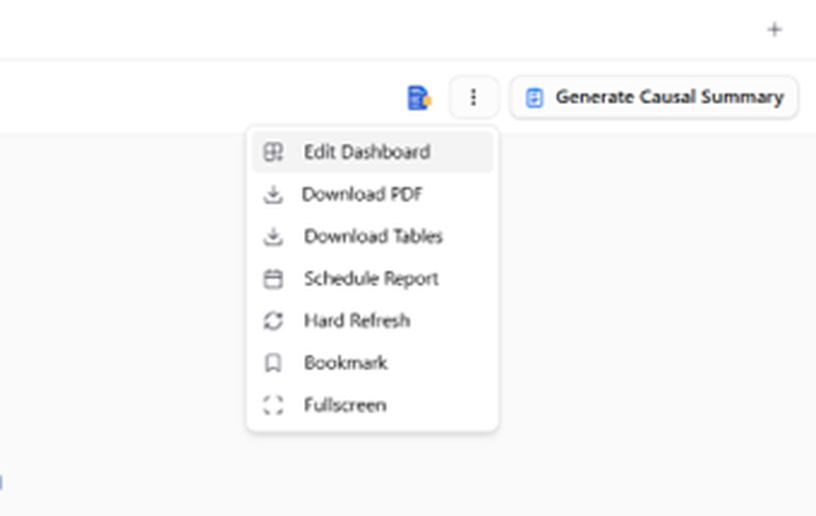
- Choose who receives it, by WhatsApp or email, and how often (for example, every morning). Save.
Get a warning when sales drop
- Select Alerts & Schedules in the left menu and create a new alert.
- Choose the dashboard, then the widget to watch: Total Sales Value.
- Give the alert a name, for example "Daily sales below 5 lakh".
- Choose when to check, for example every day at 5 pm.
- Set the rule: the column
sales_value, less than,500000(₹5 lakh). - Choose WhatsApp or email, add who should be told, and save.
You should now see
The alert in your Alerts & Schedules list.
Check after the data arrives
Set the check time after your data arrives each day (see LAST SYNC in Step 2). Otherwise the warning is based on yesterday.