
Step 4 · Prepare your data
Explain your data to FireAI
Add plain-language descriptions to your tables and columns on the FireAI Metadata page, and choose which columns stay In KB, so Ask FireAI understands coded names like GSTINVNO.
Updated September 30, 2026
Your data uses short, coded names like GSTINVNO or INVDT. FireAI reads your explanations of those names when it answers questions. This is the single best thing you can do to get good answers.
Describe your columns
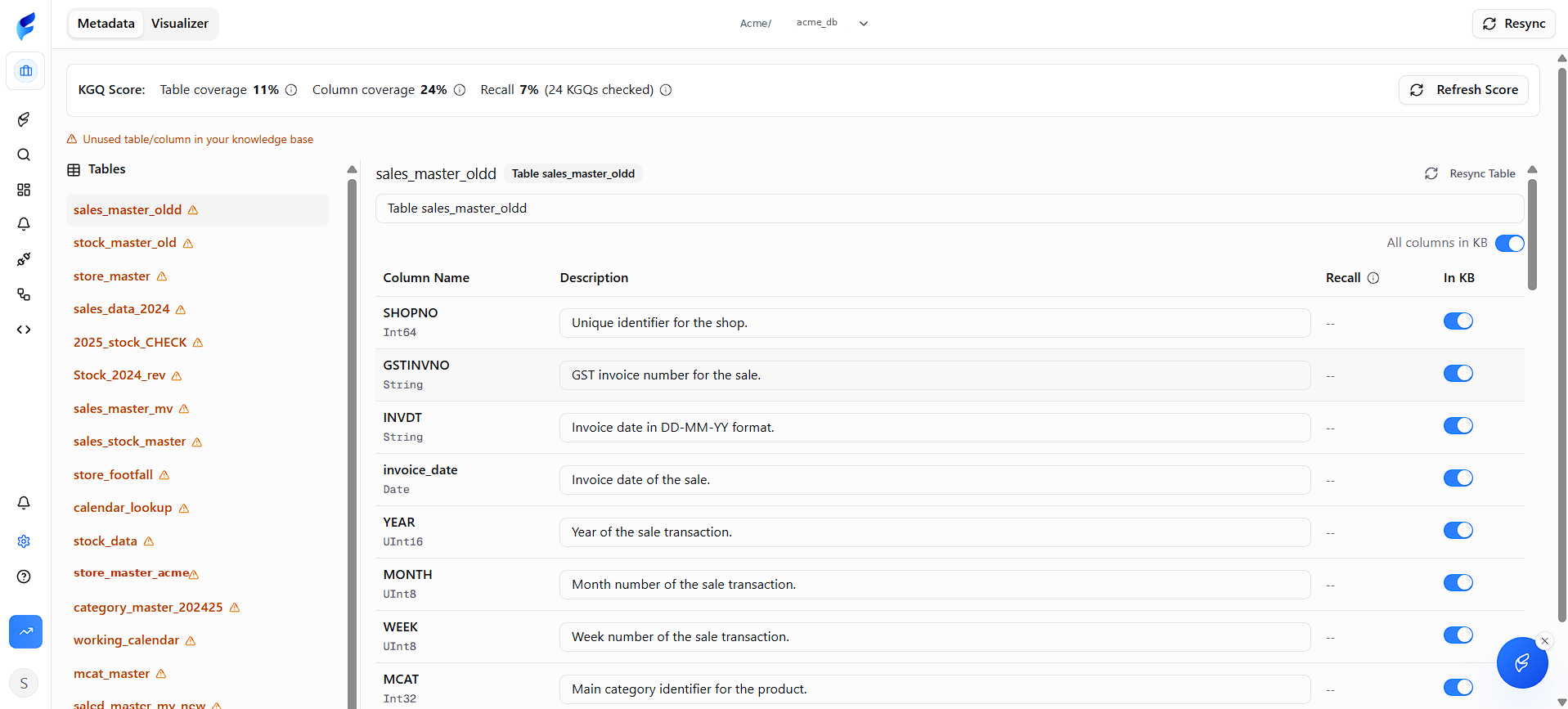
- In the middle you see each Column Name with a Description box beside it. Select a description box and type what that column means in everyday words.
Examples: column name, then its description
GSTINVNO     GST invoice number for the sale
INVDT        Invoice date as text (DD-MM-YY). Use invoice_date to filter dates.
SHOPNO       Shop code, such as S-104
sales_value Value of the sale in rupees, including GST- Do this for every column your numbers use. You can leave columns you do not use.
- On the right of each column is an In KB switch. Leave it on for columns FireAI should use. Turn it off for columns that are internal codes or out of date.
- Also add a description for the table itself, at the top. If there is an older copy of this table, write which one is correct, for example: "Main sales table. Use this, not sales_master_old."
Tips for good descriptions
- Say what it is, not what it is called. "Shop code", not "SHOPNO field".
- Use your team's words from List 2.
- Mention the format of dates and codes.
You should now see
A description beside every column your numbers use.
Stuck?
If a column name means nothing to you, ask the FireAI team or whoever manages your data. Do not guess; a wrong description is worse than none.